
What Is a Home VPN?
A VPN, or Virtual Private Network, is software that creates a secure, encrypted connection between your device and the internet. Think of it like a private tunnel for your online traffic that keeps prying eyes out.
When you use the internet without a VPN, your data travels through your Internet Service Provider (ISP) first. Your ISP can see which websites you visit and often logs this information. But when you connect through a VPN, your data is encrypted before it even leaves your device. That means your ISP and anyone else trying to snoop cannot see what you are doing online.
A VPN also hides your IP address, which is like your device’s home address on the internet. Instead of seeing where you actually are, websites only see the IP address of the VPN server you are connected to. This can make it look like you are browsing from another country altogether.
Key Benefits of Using a VPN
- Your ISP Doesn’t Need to Know Everything
Your ISP can see and record everything you do online. A VPN shields your activity from your ISP, so your online life remains your business and no one else’s. - Stay Safe on Public Wi-Fi
Never do your banking or shopping on open Wi-Fi. Even a tech-savvy teenager with a free download can watch the traffic on it. They can see what sites you visit, what you click, and can sometimes capture personal details or session tokens. A VPN encrypts that traffic, so your information becomes unreadable. - Hide your location and access more content
Because a VPN hides your real IP address, websites cannot tell where you are located. You could connect to a VPN server in France, for example, and see what is available on France’s version of Netflix. Or vice versa, when in France, you can make it appear you are back in the United States and watch your normal show lineups. - Don’t Let Websites Overcharge You
Some airlines, hotels, and online stores show different prices depending on your location. Some VPNs allow you to choose where you want to appear you are located so you could shop around for the best prices, but use a VPN paired with Private Browsing to remain anonymous during the shopping process.
Recommended VPN Features
Not all VPNs are created equal. When you are choosing a provider, look for these key features to make sure you are actually getting the privacy and protection you expect.
- No-Logs Policy
The VPN should never record your browsing history, connection times, or data usage. “No logs” means your online activity cannot be tracked or shared later. - Strong Encryption
Look for VPNs that use AES-256 encryption, the same standard used by banks and government agencies. It keeps your data unreadable to anyone who intercepts it. - Kill Switch
This feature automatically blocks your internet connection if the VPN disconnects, preventing any unprotected data from leaking. - DNS and IPv6 Leak Protection
Even when connected to a VPN, your device can sometimes reveal your real location through DNS or IPv6 requests. A good VPN protects against these leaks. - Wide Server Selection
The more countries and server options a VPN offers, the better your chances of finding fast connections and accessing content worldwide. - Multi-Device Support
Many VPN subscriptions let you secure multiple devices at once, including your computer, phone, tablet, and smart TV. - Transparent Ownership
Choose VPNs from companies that are open about who runs them and where they are based. Transparency builds trust and accountability.
Disclosure: This page contains affiliate links. If you buy through them, I may earn a commission at no extra cost to you. Learn more.
Common Misconceptions About VPNs
Even though VPNs are powerful privacy tools, they are not magic. Let’s clear up a few common misconceptions and how you can stay protected.
💬 The Claim: “When I use a VPN, I’m completely anonymous.”
🔍 The Truth: A VPN encrypts your traffic and hides your IP address, but websites can still track you through cookies, browser fingerprinting, or account logins. A VPN hides where you are, not who you are.
🛠️ The Fix: Use privacy-focused browsers such as Firefox or Brave, clear your cookies regularly, use Private Browsing or Incognito mode, and avoid logging into personal accounts when you want to stay private.
💬 The Claim: “A VPN keeps me safe from viruses.”
🔍 The Truth: A VPN protects your connection, not your computer. It will not stop you from downloading an infected file or visiting a malicious website.
🛠️ The Fix: Use trusted antivirus software alongside your VPN, keep your operating system up to date, and avoid downloading software from suspicious sites or email links.
💬 The Claim: “Free VPNs are a great budget option.”
🔍 The Truth: Remember the saying: “If you’re not paying for the product, you are the product.” Many free VPNs log your activity, inject ads, or even sell your browsing data to make money.
🛠️ The Fix: Choose a reputable paid VPN with clear privacy policies and a strict no-logs policy. A few extra dollars each month is worth knowing your data stays private. For instance, check out my review of NordVPN.
Online Safety Tips
A VPN is just one piece of the online privacy puzzle. Here are a few other ways to stay safer and protect your information every time you go online.
- Use a privacy-friendly search engine
Consider using DuckDuckGo or Startpage instead of Google. These search engines do not build profiles on you or track your search history across sites. - Keep your software up to date
Regular updates patch security holes that hackers can exploit. Always keep your operating system, browser, and apps current. - Use strong, unique passwords
A password manager such as Bitwarden or 1Password can generate and store strong passwords so you do not have to reuse the same one everywhere. - Turn on Multi-Factor Authentication (MFA)
MFA adds an extra layer of security by requiring a second step, like a code from your phone, before someone can access your account. Even if your password is stolen, it is useless without that second verification. - Browse in Private or Incognito mode when necessary
Private Browsing stops your device from saving cookies and search history, but it does not hide you from websites or your ISP. When you pair Private Browsing with a VPN, you get both local privacy and network-level protection. - Avoid oversharing on social media
Personal details such as your location, vacation plans, or workplace can be used by scammers or data brokers. Share thoughtfully and limit public visibility.
Final Thoughts
A VPN is one of the simplest tools you can use to protect your privacy online. It keeps your data secure from hackers, hides your browsing activity from your ISP, and can even help you access content from other countries.
But remember, a VPN is only one part of your online security toolkit. Combine it with good browsing habits, regular software updates, strong passwords, and antivirus protection, and you will be far better protected every time you go online.
Explore more Online Security guides for related tips, tools, and reviews.

michael@lockstologins.com
Offering practical security guidance, focused on everyday habits and solutions that help protect what matters.
Related Posts
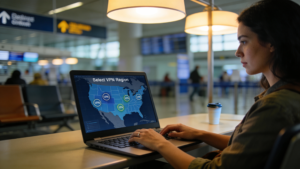
NordVPN Review 2026: Real Testing, Speed, Security & Value
This review covers NordVPN’s speed, security, reliability, and everyday performance with clear scoring and testing insights to help you decide if it’s the right VPN.
Identity Theft 101: Identity Protection Starter Guide
A simple starter guide that explains how identity theft happens, how to spot the warning signs, and the steps you can take to keep your personal information safe.

Password Security 101: The Keys to Your Kingdom
Passwords are the keys to your entire digital kingdom. With the right strategies, you can build strong, memorable passwords that keep intruders out and protect the accounts that matter most. This