
Table of Contents
Quick Answer: A good video doorbell camera should give you a clear head-to-toe view of visitors and packages, reliable motion alerts, good night performance, and a storage option you understand before buying. If you already have compatible doorbell wiring, I generally prefer a wired model for dependable power. Battery models make more sense for renters, homes without wiring, or anyone who wants the easiest installation. Before choosing a brand, check the subscription cost, local storage options, existing chime compatibility, Wi-Fi signal at the door, and whether the doorbell works with the smart-home system you already use.
Knock, knock. Who’s there? Not that long ago, you had to walk to the door and look through a peephole to find out. A video doorbell changes that. It can show you the delivery driver dropping off a package, tell you when someone is approaching before they even press the button, and let you speak to a visitor while you are sitting on the couch or miles away from home.
From a security standpoint, I like video doorbells for a simple reason: they give you information before you ever have to open the door. As a former locksmith, I have always viewed the front entrance as two separate problems. First, can someone physically get through the door? Second, can you see what is happening on the other side? A strong lock helps with the first problem. A properly placed video doorbell can help with the second.
But buying one has become more confusing than it used to be. There are wired models, battery models, subscriptions, local storage, cloud storage, AI detection, 2K and 4K cameras, package detection, smart-home integrations, and enough competing features to make a simple doorbell feel like a major technology purchase.
The good news is that most people do not need every feature. You just need to know which ones actually matter for your home.
How Does a Video Doorbell Work?
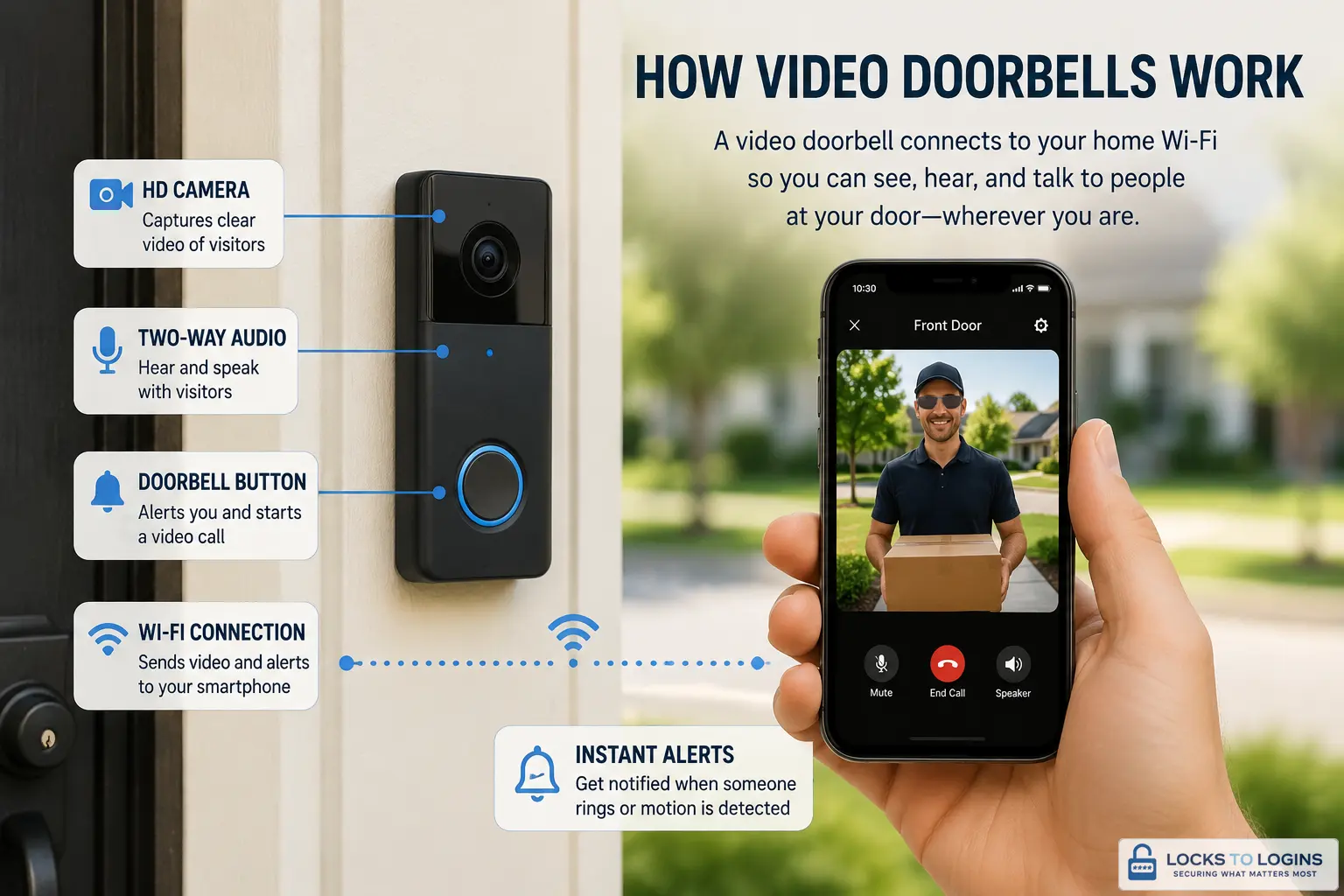
A video doorbell is basically a small security camera built around your front-door experience. It normally includes a camera, microphone, speaker, motion detection, and a button that works like a traditional doorbell.
When someone approaches or presses the button, the doorbell can send an alert to your phone. Open the app and you can usually see live video, hear what is happening, and speak through the doorbell using two-way audio.
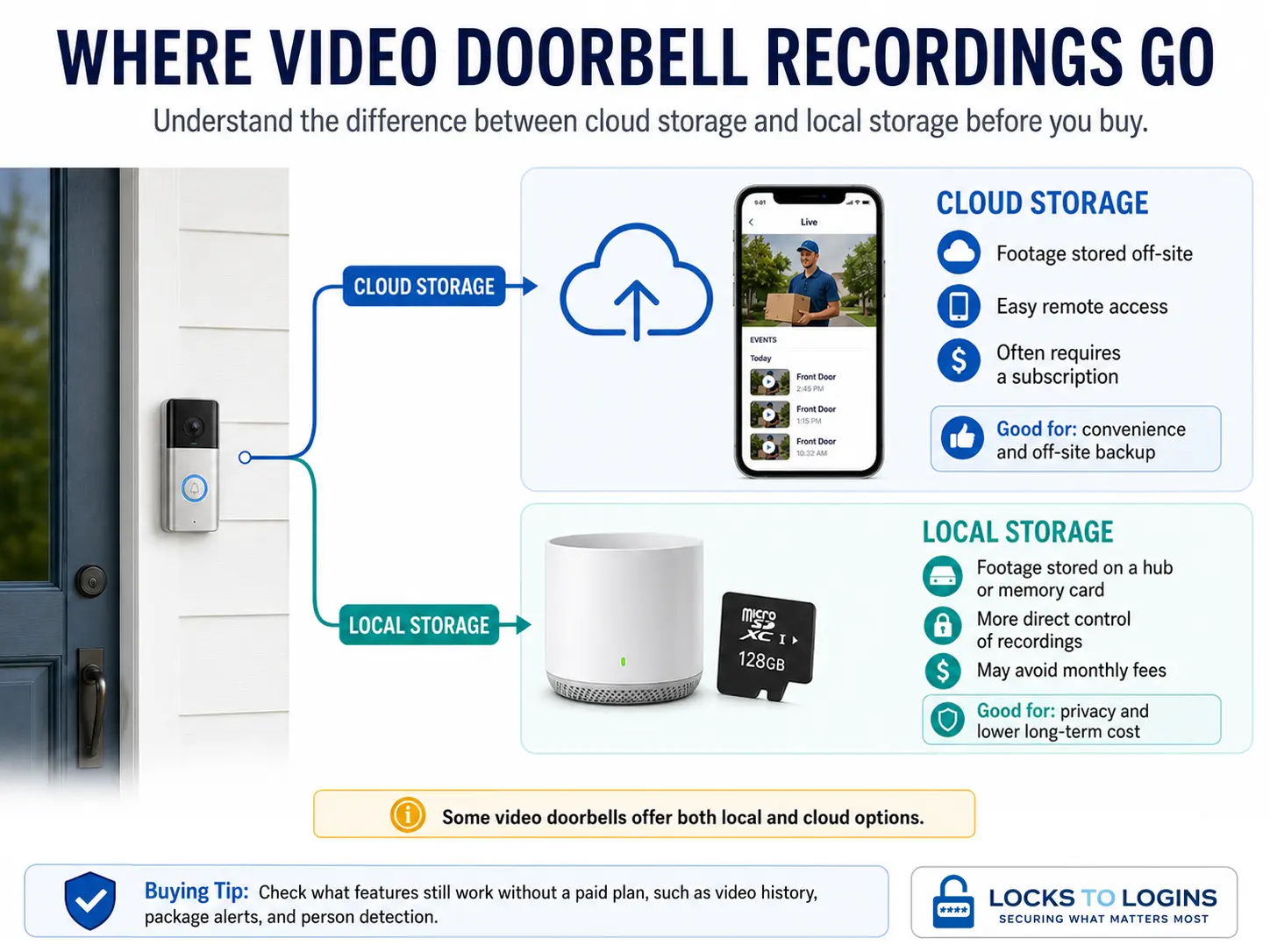
Depending on the model, recordings may be stored in the cloud, on a memory card, on an indoor hub, or on another local recording device. Some doorbells provide useful recording and detection features without a monthly fee, while others reserve video history, package alerts, advanced detection, or other features for paid plans.
Wired vs Battery Video Doorbells
One of the first decisions is how the doorbell will be powered. You will often see the terms wired, wireless, and battery-powered mixed together, which makes this more confusing than it needs to be.
A wireless video doorbell usually means a battery-powered model that does not need power wiring. That does not necessarily mean it works without Wi-Fi. Most consumer video doorbells, including many wired ones, still use Wi-Fi to communicate with the internet and your phone.
| Power Type | Best For | Advantages | Tradeoffs |
|---|---|---|---|
| Wired | Homes with compatible existing doorbell wiring | Continuous power, little maintenance, generally dependable | Installation and chime compatibility require more planning |
| Battery/ Wireless | Renters, simple DIY installs, homes without wiring | Easy installation and flexible placement | Needs recharging and battery life varies with activity and weather |
| PoE | Advanced or professionally wired camera systems | Power and network connection through Ethernet, very stable | Requires Ethernet cabling and more involved installation |
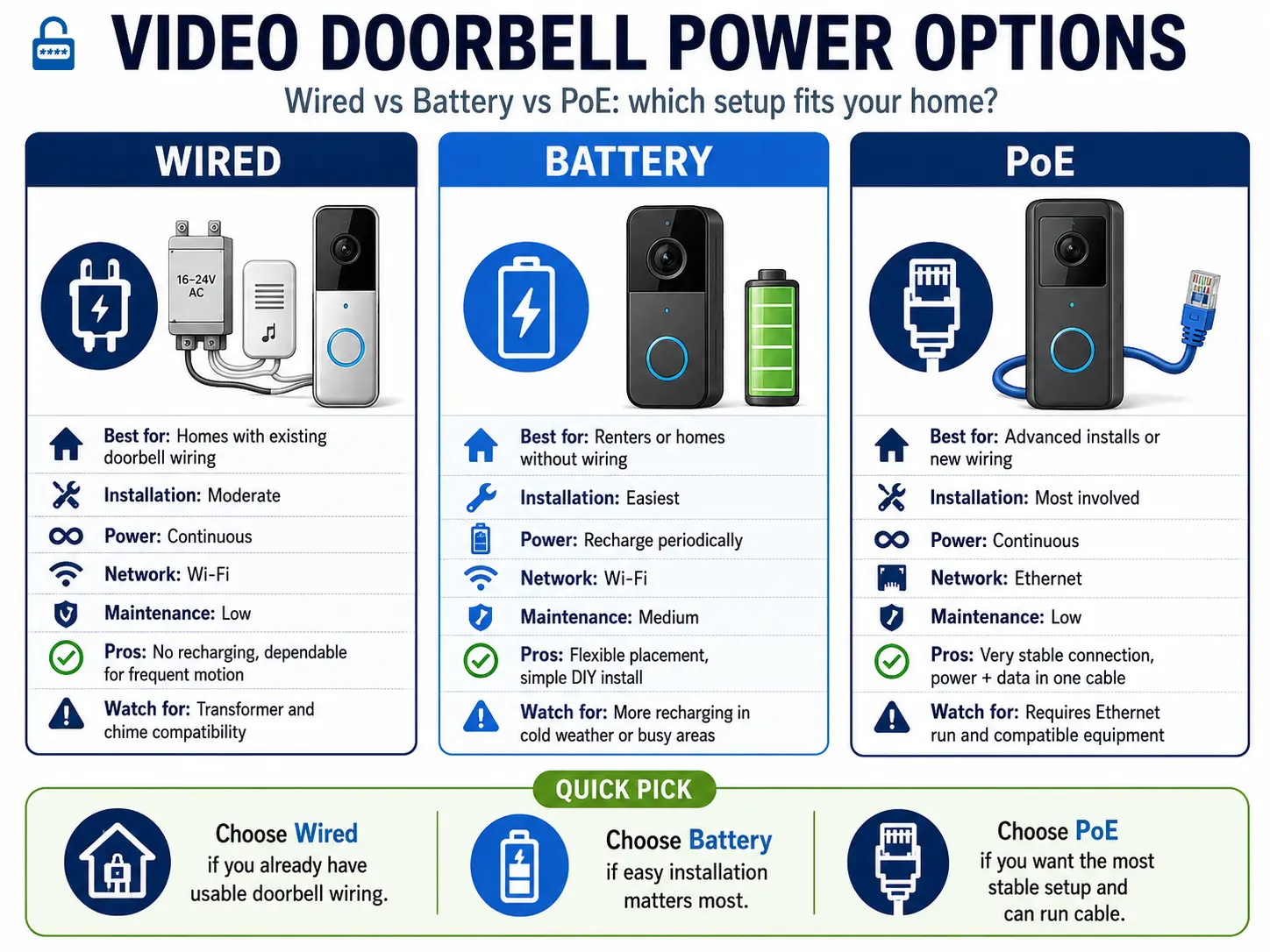
If compatible wiring already exists at my front door, I would normally start by looking at wired models. If there is no wiring, I would not run new cable just to avoid a battery unless I had another reason to do it. A good battery model is much easier to install and may be the better practical choice.
Pro Tip: Do not assume a wired video doorbell will automatically work with your existing indoor chime. Check the required transformer voltage and chime compatibility for the exact model before buying. Some newer doorbells require an adapter, bypass the old chime, or use a separate electronic chime instead.
Video Quality Matters, But Resolution Is Not Everything
1080p used to be the standard target for video doorbells. Today, 2K and even 4K models are common. More resolution can help, especially when you want to zoom into an image, but I would not choose a doorbell based on resolution alone.
A sharp 4K image is not very useful if the camera misses the package sitting directly below it, struggles with bright sunlight behind a visitor, or produces poor night footage.
I would pay attention to these features before obsessing over the biggest resolution number:
- Head-to-toe viewing: You want to see the visitor’s face and the ground near your door.
- Vertical field of view: This is especially useful for seeing packages left directly against the house.
- HDR: Helpful when the porch is shaded but the background is extremely bright.
- Low-light performance: Good night footage matters more than impressive daytime specifications.
- Useful zoom: Digital zoom is only helpful when the original image contains enough detail.
If deliveries are one of your main concerns, make package visibility a priority. A slightly lower-resolution camera that clearly sees the ground can be more useful than a higher-resolution camera aimed mostly at chest level.
For additional ways to protect deliveries, see our guide to package theft prevention.
Pro Tip: Before installing anything, stand where the doorbell will be mounted and hold your phone at roughly the same height. Look at what the camera would see. Can you see an approaching person’s face? Can you see the ground where a delivery driver normally leaves a box? This simple check can save you from drilling holes in the wrong spot.
Motion Detection Can Make or Break the Experience
The camera itself gets most of the attention, but motion detection is what determines how useful the doorbell feels day to day.
Basic motion detection can trigger every time a tree moves, a car passes, or someone walks down the sidewalk. Better systems can distinguish between people, packages, vehicles, animals, and general motion. Activity zones can also help you tell the camera which areas matter and which areas it should ignore.
This is important because constant meaningless alerts eventually become background noise. Once you start ignoring notifications, the doorbell loses much of its value.
I would rather have a doorbell that sends ten useful alerts than one that sends fifty alerts and makes me check forty false alarms.
Think About Storage Before You Choose a Brand
This is one of the most important buying decisions and one of the easiest to overlook.
Some video doorbells rely heavily on cloud storage and a monthly subscription. Others can save recordings locally to a microSD card, an indoor hub, an NVR, or another device inside your home. Some offer both.
| Storage Type | Advantages | Things to Consider |
|---|---|---|
| Cloud | Easy remote access and off-site recording | May require a recurring subscription and stores footage with a third party |
| Local | Can avoid recurring fees and gives you more direct control of recordings | Storage capacity and backup options vary by device |
| Hybrid | Combines local recording with optional cloud features | Can cost more upfront and still require a subscription for certain features |
A “video doorbell without subscription” does not necessarily mean every feature is free. The important question is what still works without paying each month. Can you save recordings? Do you still get person or package alerts? Can you review events later, or only watch live video?
Read the free-versus-paid feature list before purchasing, not after the doorbell is mounted to your house.
Check Your Wi-Fi at the Door
A great video doorbell with a weak network connection becomes a frustrating video doorbell.
Wi-Fi signal strength at the front door can be surprisingly different from what you get inside the house. Brick, stone, metal siding, insulated exterior doors, and distance from the router can all affect the connection.
Test the signal with the front door closed. That is how the doorbell will actually operate. If your phone already struggles to hold Wi-Fi while you are standing outside the door, the doorbell may have problems too.
Some devices work only on 2.4 GHz Wi-Fi, while others support 5 GHz or multiple bands. Check the specifications for the exact model rather than assuming it will connect to whatever network you have.
If the front of your house has a weak signal, fix that first. Our Home Wi-Fi Security guide covers network setup, guest networks, updates, and other ways to keep connected devices both reliable and secure.
Do You Need a Subscription?
No, but you need to understand what you lose without one.
Subscription plans frequently pay for things such as cloud video history, longer retention periods, advanced object recognition, searchable events, richer notifications, and other premium features. The exact mix varies considerably by manufacturer and can change over time.
If you dislike recurring fees, start your search with local-storage doorbells rather than buying a cloud-first model and trying to work around the subscription later.
Also look beyond the first year. A doorbell that costs $50 less upfront may become the more expensive option after several years of subscription payments.
Smart Home Compatibility Matters More Than You Think
If you already have smart speakers, displays, cameras, or other connected devices, staying in the same ecosystem can make your setup much easier to use.
For example, someone heavily invested in Google Home will probably want to compare Nest first. A house built around Alexa should look closely at Ring and other Alexa-compatible doorbells. Apple Home users need to verify support for Apple Home and any video features they specifically want. People who care most about local storage should compare platforms that make local recording a core part of the product rather than an afterthought.
Current manufacturer documentation confirms that Ring remains closely integrated with Alexa, Google continues to build Nest Doorbells around Google Home, eufy offers local-storage doorbell options, and ecobee supports Apple HomeKit on its wired doorbell. Compatibility can change, so verify the exact model before buying.
Do not choose a whole smart-home ecosystem just because one doorbell has an impressive specification. Choose the system you will actually want to live with for the next several years.
Video Doorbell Installation and Placement
Battery models are usually straightforward DIY installations. Wired doorbells take a little more planning because you need to confirm power requirements, transformer compatibility, wiring condition, and sometimes the existing chime.
For most front doors, mounting around 48 inches from the ground is a useful starting point, but follow the recommendation for your specific model. The camera angle matters more than hitting one perfect measurement.
After mounting, check the live view and ask:
- Can I clearly see a visitor’s face?
- Can I see the package area near the door?
- Is the street creating unnecessary motion alerts?
- Does bright sunlight wash out the person standing on the porch?
- Do porch lights create glare at night?
- Would an angled mounting wedge improve the view?
Then check it again after dark. A camera position that looks perfect at noon can behave very differently at night.
Former Locksmith’s Tip: A video doorbell can help you see someone approaching, but it does not make the door itself harder to force open. Make sure the deadbolt works correctly, the door closes squarely, and the strike plate is solidly secured to the frame. Cameras provide awareness. Good locks and a strong frame provide the physical barrier. For more on that side of the equation, see my Door and Window Security 101 guide.
Video Doorbell Privacy and Account Security
A video doorbell is a connected camera pointed at one of the busiest parts of your property, so privacy deserves more attention than simply choosing a strong password.
Start with the basics:
- Use a strong, unique password for the doorbell account.
- Enable multi-factor authentication if the manufacturer supports it.
- Keep the doorbell firmware and mobile app updated.
- Give family members their own shared access when possible instead of sharing one password.
- Review who currently has access to the camera.
- Review privacy zones, recording settings, microphones, and video-retention options.
- Avoid aiming the camera directly into a neighbor’s windows or other private areas.
Also think about where the recordings are stored. Cloud storage is convenient, but it means another company is involved in storing your footage. Local storage gives you more direct control, but it creates its own responsibility for protecting and backing up recordings.
For a deeper look at the information connected cameras and other devices can collect, read our guide to smart home device privacy.
Pro Tip: After installation, spend five minutes going through every security and privacy setting in the app. The default settings were chosen to make setup easy, not necessarily to match your preferred level of privacy.
A Video Doorbell Is Not a Complete Security Camera System
A front-door camera is useful, but it only sees what is in front of it.
Someone approaching from a side yard, rear door, garage, or another blind spot may never appear in the doorbell’s view. A video doorbell works best as one layer in a broader home-security setup rather than as the only camera protecting the property.
If you decide to add more coverage later, our Home Security Camera Tips guide explains placement, angles, lighting, and common blind spots.
Video Doorbell Maintenance
Video doorbells are fairly low maintenance, but they are not completely set-and-forget devices.
A few simple habits help keep them working properly:
- Clean the camera lens gently with a microfiber cloth.
- Recharge battery models before the battery becomes critically low.
- Keep firmware and the mobile app updated.
- Check motion zones if trees, landscaping, or seasonal decorations change.
- Remove cobwebs and debris around the lens and motion sensors.
- Check night footage occasionally rather than assuming it still looks good.
- Verify that important family members still receive alerts.
- Review your subscription once a year to make sure you are still using the features you pay for.
The Limitations of Video Doorbells
Video doorbells are useful, but they are not magic.
Weak Wi-Fi can delay live video and notifications. Battery life can drop when there is heavy motion activity or extreme weather. Cloud-dependent features can stop working during internet or service outages. Motion alerts may need tuning. Some useful features may require a paid subscription.
There is also the simple problem of camera angle. A doorbell can provide an excellent view of your porch while seeing almost nothing happening twenty feet to the side.
Knowing those limits before you buy is much better than discovering them afterward.
How I Would Choose a Video Doorbell Today
If I were starting from scratch, I would not start by asking which brand has the most features. I would answer five questions first:
- Do I have usable existing doorbell wiring?
- Can the camera clearly see both faces and packages?
- Do I want cloud storage, local storage, or both?
- Which important features require a subscription?
- Which smart-home ecosystem do I already use?
Those answers will narrow the field quickly.
If I already had a house full of Google Home devices, Nest would be one of the first doorbells I would compare. If I were heavily invested in Alexa, I would look closely at Ring. If avoiding monthly subscriptions were my biggest priority, I would start by comparing established local-storage options instead.
What I would not do is buy a doorbell simply because one specification says 4K, AI, Pro, Ultra, or any other impressive-sounding label. The best video doorbell is the one that reliably shows you what matters at your particular front door without making you fight the app every day.
Final Thoughts
A video doorbell is one of the easier ways to add useful awareness around your home. You can check who’s outside before opening the door, keep an eye on deliveries, talk to visitors remotely, and review activity when something seems out of place.
The trick is choosing one based on how you will actually use it.
Start with power and placement. Make sure the camera can see the right area. Decide how you want recordings stored. Understand the subscription before buying. Check your Wi-Fi. Then choose the smart-home ecosystem and extra features that make sense for your household.
Do that, and you are much more likely to end up with a doorbell you actually appreciate instead of another smart device sending notifications you eventually learn to ignore.
Explore more Home Security guides for related tips, tools, and practical ways to protect your home.
Video Doorbell FAQs
Will a video doorbell still work if the internet goes out?
It depends on the model. You will normally lose remote live viewing and internet-based notifications during an outage, but some doorbells with local storage may continue recording events. Check how the exact model handles internet outages if local recording is important to you.
Can a video doorbell ring my existing indoor doorbell chime?
Sometimes. Chime compatibility varies by doorbell, transformer, and whether your existing chime is mechanical or electronic. Some models work directly with existing chimes, while others require an adapter, bypass the old chime, or use a separate wireless chime or smart speaker.
Can someone steal a video doorbell?
Yes. Video doorbells are mounted outside and can potentially be removed or damaged. Security screws and anti-theft mounts can make removal more difficult, and storing recordings in the cloud or on an indoor hub helps prevent the footage from disappearing with the device.
Can renters install a video doorbell?
Often, yes. Battery-powered, peephole, and no-drill mounting options can work well for rentals, but check your lease or ask your landlord before drilling holes, changing existing wiring, or replacing permanent door hardware. Our Home Security for Renters guide covers additional no-drill security options.
Can several family members use the same video doorbell?
Most major platforms allow some form of household or shared access. When possible, invite each person through their own account rather than giving everyone the primary account password. That makes access easier to manage and revoke later.
Is local storage better than cloud storage?
Neither is automatically better. Local storage can reduce recurring fees and gives you more direct control over recordings, while cloud storage provides convenient off-site access and keeps footage available even if the doorbell itself is stolen. The best option depends on your priorities.
Can a video doorbell record continuously?
Some wired doorbells and compatible camera systems support continuous recording, but many video doorbells record only when motion or another event is detected. Battery-powered models are especially likely to use event-based recording to conserve power. Check the recording modes and any subscription requirements before buying.
Does a video doorbell replace an outdoor security camera?
Usually not. A video doorbell is excellent for the immediate front-door area, but its field of view is limited. A separate outdoor camera can cover driveways, side entrances, garages, yards, and other areas that the doorbell cannot see.
A video doorbell can give you a better view of what’s happening at your front door, whether it’s a delivery, a visitor, or unexpected activity. If you found this guide useful, share it with someone thinking about adding one to their home.

Michael Kendrick
Director of IT and former Certified Registered Locksmith with 27 years in technology and cybersecurity. Practical, everyday guidance to help you protect everything from the locks on your doors to the logins on your accounts.
Keep Learning: More Security Guides

Package Theft Prevention: 10 Ways to Stop Porch Pirates
Package theft is often a crime of opportunity. Learn practical ways to stop porch pirates, secure your deliveries, choose safer pickup options, and know exactly what to do if a package
Home Security Camera Placement: Locations, Angles & Tips
Smart security camera placement is about capturing useful footage, not simply covering more area. Learn where to position cameras, improve viewing angles and night footage, reduce blind spots, and properly test
Smart Home Device Privacy: What They Collect and How to Stop It (2026)
Smart home devices are convenient, but they can also be surprisingly chatty. From voice assistants to robot vacuums, here is what your devices actually collect, who sees that data, and practical