
Quick Answer: Before leaving for vacation, secure every door and window, pause mail and package deliveries, use realistic lighting schedules, test alarms and cameras, reduce water and fire risks, and give a trusted local contact a way to respond. Start 24 to 48 hours before departure, then finish with the same five-minute walkthrough every trip.
Table of Contents
Vacation preparation has a way of ending with one last rushed lap around the house. You check the stove, pull on the front door, stare at the garage for a second, and then spend the first hour of the trip wondering what you forgot.
A repeatable vacation home security checklist fixes that problem. Instead of relying on memory while everyone is trying to leave, you work through the same steps in the same order every time.
The goal is not simply to lock the front door. You also want to remove signs that the house is empty, secure overlooked entry points, confirm your security equipment works, and reduce the chance of returning to water damage, spoiled food, storm damage, or another preventable problem.
Pre-Vacation Home Security Checklist at a Glance
This timeline keeps the important tasks from getting lost in the rush to leave.
| When | Main Goal | Highest-Priority Tasks |
|---|---|---|
| 48 hours before | Remove signs of an empty home | Hold mail, manage packages, arrange local help, plan yard care, and avoid posting travel dates |
| 24 hours before | Test protection and household systems | Test alarms, cameras, locks, lighting, smoke alarms, plumbing, leak sensors, sump pump, and thermostat |
| Before loading the car | Secure the property | Lock doors, windows, garage, gates, sheds, tools, ladders, and valuables |
| Final five minutes | Confirm everything | Check appliances, water, locks, alarm status, notifications, and the garage door |
| After departure | Avoid creating new risks | Keep travel details private and respond promptly to meaningful security alerts |
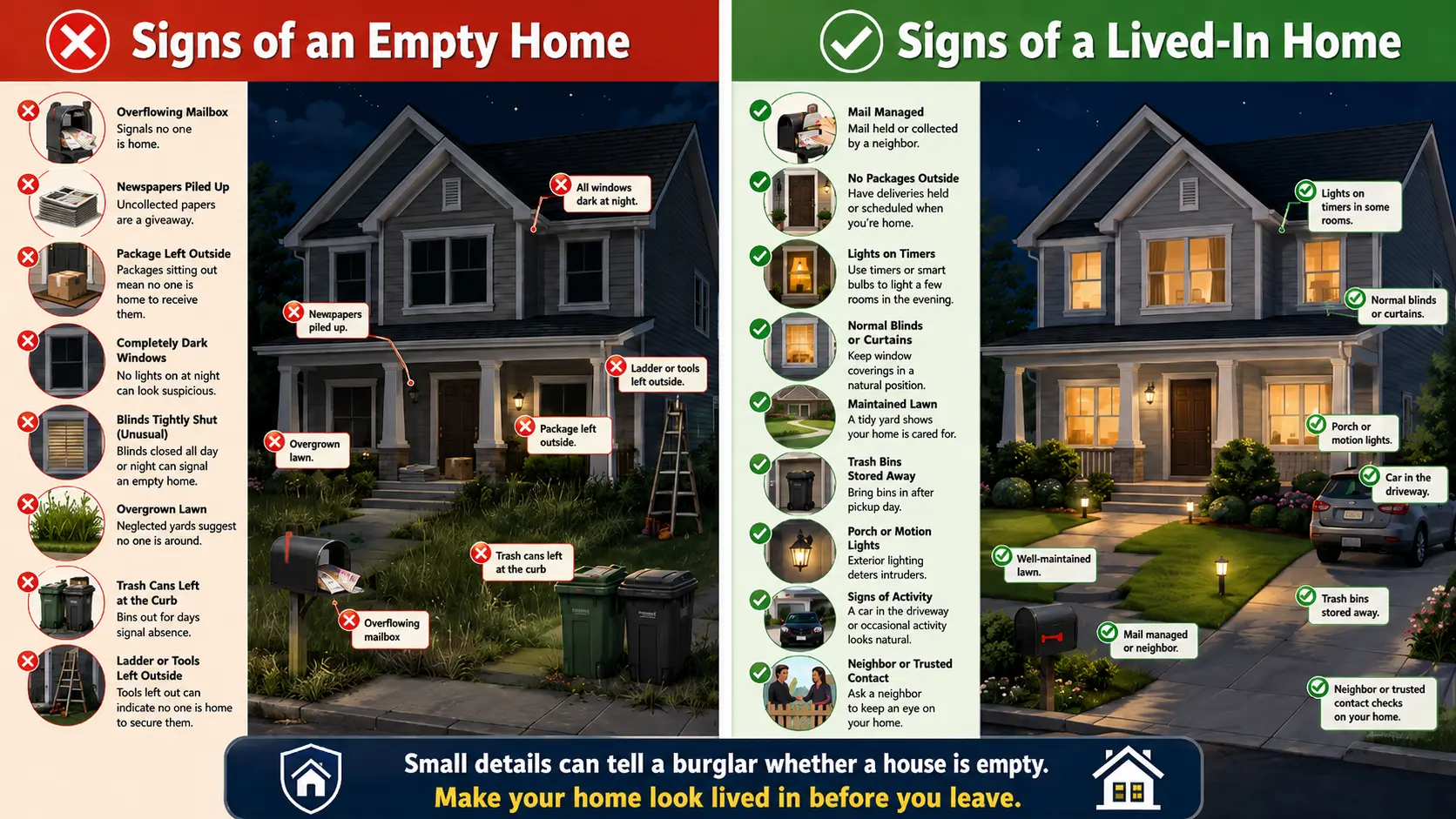
48 Hours Before You Leave
1. Place Your Mail on Hold
Mail sticking out of a mailbox is one of the easiest ways to tell that no one has been home for several days.
Submit a USPS Hold Mail request or arrange for a trusted person to collect your mail. USPS generally allows mail to be held for up to 30 days. Longer absences may require temporary forwarding instead.
Do not wait until you are already driving to the airport. Identity verification may be required before an online request can be completed.
2. Reschedule or Redirect Package Deliveries
A package sitting on the porch creates two problems. It advertises that no one is collecting deliveries, and it gives a package thief something to take.
Check pending Amazon, UPS, FedEx, and retailer orders. Delay them, redirect them to a staffed pickup location, or ask someone to bring them inside. For more ideas, see our guide to preventing package theft.
Holding USPS mail does not automatically stop packages from private delivery companies, so handle those separately. Ask your local contact to remove unexpected packages, flyers, menus, or door hangers that appear while you are away.
3. Choose a Trusted Local Contact
Technology is useful, but it cannot pick up a fallen tree branch, investigate water in the basement, or bring an unexpected package inside.
Give one trusted neighbor, friend, or family member:
- Your travel dates
- Your mobile number
- A backup emergency contact
- A working key or temporary smart-lock code
- Alarm instructions, if they may need to enter
- The location of the main water shutoff
- The name of your alarm or monitoring provider
Also arrange care for pets and plants, and make sure any house sitter has clear entry, alarm, feeding, watering, and emergency instructions.
When possible, create a temporary smart-lock code that can be disabled after the trip instead of sharing your permanent code. Our smart lock guide explains the features worth looking for.
Pro Tip: Put everything in one short message or printed note. Do not make someone search through old texts while an alarm is sounding or water is running across the floor.
4. Arrange Lawn, Snow, Trash, and Driveway Help
An overgrown lawn, untouched snow, or garbage cans sitting at the curb for several days can make an absence obvious.
For longer trips, arrange for someone to:
- Mow the lawn
- Shovel snow
- Move garbage and recycling cans
- Pick up flyers or door hangers
- Park in the driveway occasionally
- Check the property after severe weather
- Trim bushes or branches that block views of doors, windows, or security cameras
The goal is not to stage an elaborate performance. You simply want the property to continue looking normal.
5. Delay Social Media Posts
Airport check-ins, vacation countdowns, hotel photos, and real-time location posts can reveal exactly when your home is empty.
Wait until you return before posting trip photos publicly. Private accounts reduce exposure, but screenshots, shared posts, tagged photos, and compromised accounts can still spread information beyond the audience you expected.
24 Hours Before You Leave
6. Create Natural-Looking Lighting Schedules
A house that stays completely dark every evening may look empty. A house with one lamp glowing nonstop for a week does not look particularly convincing either.
Use timers, smart plugs, or smart bulbs to turn lights on in different rooms at slightly different times. A living-room lamp might run earlier in the evening, followed by a bedroom light later.
A basic outlet timer works well for a single lamp, while a smart plug such as the Kasa Smart Plug Mini gives you more control over schedules and lets you check the device from your phone.
Keep exterior lighting consistent with your normal routine. Motion lighting is useful around entrances, garages, walkways, and darker sides of the home. Our outdoor lighting guide covers the best places to use it.
If your smart-home platform offers a vacation or presence-simulation mode, activate it and test the routine before departure.
Pro Tip: Test the entire schedule at least one evening before the trip. A routine that looks correct in the app may still have the wrong time zone, an inactive device, or a lamp that was switched off manually.
7. Test the Alarm System
Do not assume the alarm works because the keypad lights up.
Confirm that:
- Exterior doors register as open and closed
- Window sensors respond
- Motion detectors activate
- Glass-break sensors are online
- Sirens work
- The monitoring account has current contact information
- Everyone leaving knows the correct arming procedure
If your monitoring provider accepts vacation notices or temporary contacts, update that information before leaving. Confirm who should be called if you cannot be reached and whether your local contact is authorized to respond.
8. Test Cameras and the Video Doorbell
Open each camera in the app and confirm that you can see a clear, current picture. Then walk through each detection area to make sure motion alerts actually reach your phone.
Check:
- Camera positioning
- Night vision
- Lens cleanliness
- Battery level
- Wi-Fi signal
- Recording storage
- Motion zones
- Notification settings
- Date and time accuracy
A live image alone does not prove that recordings or alerts are working. If you are still choosing equipment, our video doorbell guide explains the basics. For more help choosing camera locations, angles, and coverage areas, see our guide to home security camera placement and coverage.
Pro Tip: Trigger every important camera yourself. Walk up the driveway, approach the back door, and open the garage. You want to know what an alert looks like before you are hundreds of miles away.
9. Check Smart Locks, Garage Controls, and Device Batteries
Replace low batteries before leaving. Do not wait for an app to report 1 percent battery while you are already out of state.
Confirm that:
- Smart locks report the correct door status
- Auto-lock is enabled where appropriate
- Temporary access codes work
- Garage controls show the correct open or closed status
- Smart devices have current firmware
- Important accounts use strong passwords and multi-factor authentication
- Your router and smart-home hub are online
Cameras, lighting routines, alarms, garage controls, and leak sensors may all depend on the router or smart-home hub. Restart or troubleshoot unreliable equipment before the trip rather than waiting until you are away.
For compatible garage-door openers, a myQ Smart Garage Control can provide remote door-status checks and alerts when the garage is left open. Confirm compatibility with your opener before purchasing.
If smart-home or camera passwords are overdue for an update, change them several days before departure. Then confirm that every device, app, and authorized user can still connect.
Avoid making major account or equipment changes while you are walking out the door.
Keep a physical backup key available through your trusted local contact. A smart lock may continue working locally during an internet outage, but remote access can be lost.
Pro Tip: If your alarm or cameras offer cellular backup, confirm it is active before you leave. A power or internet outage can interrupt remote alerts, so know which security features will continue working if your home loses its normal connection.
10. Test Smoke and Carbon Monoxide Alarms
A vacation checklist should protect the house from more than burglary.
Use the test button on each smoke and carbon monoxide alarm. Replace low batteries and investigate any device that is expired, damaged, or repeatedly reporting trouble.
Do not unplug or disable these alarms to stop a nuisance chirp. Fix the cause before you leave.
11. Inspect Plumbing, Leak Sensors, and the Sump Pump
Water damage becomes much worse when no one is present to notice it.
Look around toilets, sinks, the water heater, refrigerator supply line, dishwasher, washing machine, basement, and utility room. Check for moisture, corrosion, cracked hoses, staining, or slow drips.
Test water sensors and make sure alerts reach your phone. For remote alerts, look for a Wi-Fi leak detector with sensors that can be placed near the water heater, washing machine, sump pit, refrigerator, and basement drains. The GoveeLife Wi-Fi Water Leak Detector Kit is one example designed to send alerts through a connected gateway.
If your home has a sump pump, verify that the pit is clear and the pump operates properly.
Know the locations of both the main water shutoff and individual appliance valves. For a longer absence, you may want to close individual appliance valves or consider shutting off the main water supply. Travelers provides additional guidance on protecting a home from water damage while away.
Consult a qualified professional before shutting off the entire supply if you are unsure how your plumbing, heating, fire sprinkler, irrigation, or other systems will be affected.
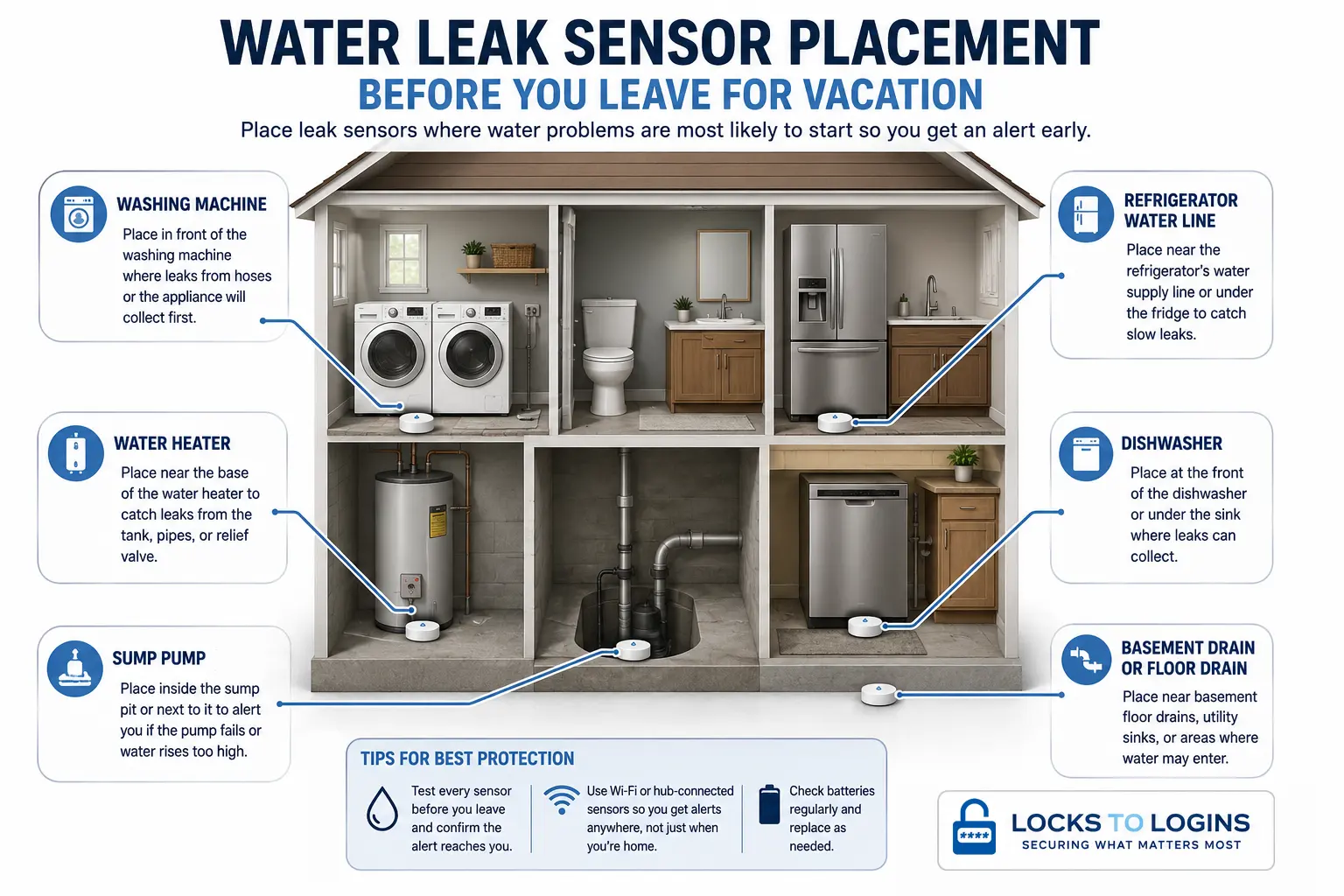
Pro Tip: Put leak sensors where water is likely to collect first, not simply somewhere near the appliance. Test each sensor before leaving and confirm that the alert actually reaches your phone.
12. Adjust the Thermostat and Prepare for Weather
Do not turn the HVAC system completely off just to save energy.
During freezing weather, maintaining at least 55°F is commonly recommended to help protect plumbing in walls and other vulnerable areas. Hot and humid climates may require continued air conditioning to control temperature and moisture.
Before leaving:
- Check the forecast for your home
- Secure lightweight outdoor objects
- Move patio furniture when severe weather is possible
- Close and latch storm windows
- Clear important drains
- Confirm the sump pump is ready
- Keep heating active during freezing weather
- Consider pets, plants, electronics, and indoor humidity when adjusting temperatures
Secure Every Entry Point
13. Lock and Test Every Exterior Door
Check the front, back, side, basement, mudroom, patio, and garage-to-house doors.
Close each door completely, engage the deadbolt, and gently push or pull on it. This confirms that the bolt actually entered the strike plate instead of stopping against a misaligned frame.
For a deeper look at door frames, deadbolts, windows, sliding doors, and other common weak points, see our guide on how to secure your doors and windows.
Former Locksmith’s Tip: A deadbolt should extend fully without needing to lift, push, or pull the door into position. If the bolt binds during normal use, fix the alignment before leaving instead of trusting a partially engaged lock.
14. Remove Hidden Spare Keys
The flowerpot, fake rock, grill, mailbox, and top of the door frame are not secret locations.
Collect outdoor spare keys and give one directly to the person helping with the property. A temporary smart-lock code is another option because it can be disabled when the trip ends.
Do not label a loose spare key with your address.
15. Close and Lock Every Window
Check more than the obvious ground-floor windows.
Include:
- Basement windows
- Garage windows
- Bathroom windows
- Windows behind curtains
- Upper-level windows near roofs, decks, trees, or ladders
- Windows opened recently for ventilation
Close each window fully before engaging the latch. Some windows can appear locked even when the sash is not seated correctly.
16. Reinforce Sliding Glass Doors
Close and lock every sliding door, then add a secondary barrier such as a properly sized track rod, dowel, or dedicated sliding-door lock.
An adjustable patio-door security bar is a cleaner alternative to a cut wooden dowel and can be fitted more closely to the available track space.
The original latch on many sliding doors is relatively light. A secondary device limits movement even if the latch is manipulated or damaged. See our complete guide to securing sliding glass doors for more options.
Do not use a track rod that is several inches too short. Excess space can provide enough movement to defeat the purpose.
17. Secure the Garage
Confirm that the overhead garage door closes completely and that the interior door connecting the garage to the house is locked.
Also check:
- Exterior garage service doors
- Garage windows
- Smart opener status
- Battery backup condition
- Remotes stored in vehicles
- The opener’s vacation-lock feature, if available
Remove garage-door remotes from vehicles that will remain parked outside. If your opener includes a vacation-lock feature, enable it after confirming the overhead door is completely closed.
18. Lock Gates, Sheds, and Outbuildings
A locked house does not help much if ladders, pry bars, power tools, or expensive equipment are sitting in an unlocked shed.
Lock gates and storage buildings. Secure bicycles, lawn equipment, generators, and other portable items.
19. Put Away Ladders, Tools, and Climbing Aids
Move ladders, stacked furniture, tools, and large garbage containers away from the house.
Anything that provides height, leverage, or concealment can make an overlooked window or upper-level opening easier to reach.
20. Secure Valuables and Important Documents
Move jewelry, cash, spare keys, sensitive records, portable electronics, and firearms out of sight.
A quality home safe should be anchored to an appropriate structural surface. A small unanchored safe can become a convenient container for carrying valuables out of the home. Our home safe buying guide explains the types of protection to consider.
Do not place all important records and backup drives in the same location if fire, water, or theft could destroy everything at once.
Travel and Document Safety: Keep secure copies of passports, identification, insurance information, and other important travel documents. Enable transaction alerts on the accounts you plan to use, and check whether your bank or card issuer requires any travel-related account steps.
Low-Cost Home Security Without an Alarm System
Not everyone can afford a complete alarm system or monthly professional monitoring. Fortunately, there are still inexpensive and even free ways to make your home a less attractive target while you are away.
Start with the basics that provide real protection. Lock every door and window, remove hidden spare keys, keep bushes trimmed around entry points, put away ladders and tools, use inexpensive lighting timers, and ask a trusted neighbor to keep an eye on the property. Even without an alarm system, these steps can make a home harder to enter and less obviously empty.
You can also use visible deterrents to create uncertainty. A generic alarm sign, video-surveillance sign, realistic-looking dummy camera, or “Beware of Dog” sign may make a casual or opportunistic intruder wonder whether an alarm will sound, a camera is recording, or someone nearby may be alerted.
These deterrents do not provide the protection of a real alarm, camera, or dog. However, when money is tight, making your home appear more protected can still be better than giving a potential intruder no reason at all to reconsider.
The strongest approach is to combine those visible deterrents with simple security measures that are actually in place. Locked doors and windows, motion-activated lighting, maintained landscaping, timed interior lights, and signs that the home is occupied all reinforce the impression that your house may be more trouble than it is worth.
Affordable options include generic alarm signs, video-surveillance signs, realistic dummy cameras, and Beware of Dog signs.
Reduce Fire, Water, and Household Risks
21. Unplug Unnecessary Small Appliances
Unplug devices that do not need to remain powered, particularly:
- Coffee makers
- Toasters
- Hair tools
- Portable heaters
- Chargers
- Desktop computers
- Entertainment equipment
- Decorative lighting
Leave refrigerators, freezers, alarms, security equipment, routers, smart-home hubs, sump pumps, and other necessary systems powered.
Do not start a dishwasher, washing machine, or dryer immediately before leaving. Appliances and their water connections can fail while no one is home to respond.
22. Remove Trash and Perishable Food
Empty indoor trash cans, run the garbage disposal, and remove food that will spoil before you return.
Check:
- Kitchen counters
- Fruit bowls
- Refrigerator
- Pet-food dishes
- Dishwasher
- Coffee maker
- Indoor recycling
- Diaper or litter containers
This reduces odors, insects, leaks, and unpleasant surprises when you get home.
23. Decide How to Manage the Water Supply
For a short trip, checking for leaks and closing the washing-machine supply valves may be enough.
For a longer absence, consider whether you should:
- Close individual appliance valves
- Shut off the main water supply
- Place leak sensors near high-risk fixtures
- Enable an automatic water shutoff
- Ask someone to inspect the home periodically
Do not shut off the main water supply without understanding how it affects boilers, fire sprinklers, water heaters, irrigation, humidifiers, and other connected systems.
Ask a plumber or other qualified professional when the correct procedure is unclear.
24. Leave Clear Emergency Instructions
Your local contact should know what they are authorized to do.
Provide simple instructions for:
- Alarm activations
- Water leaks
- Power outages
- Storm damage
- Unexpected deliveries
- Pet or plant emergencies
- Calling a repair company
- Contacting your insurance provider
Avoid sharing master passwords. Create a temporary door code or limited access method whenever possible.
25. Complete the Final Five-Minute Walkthrough
Follow the same route every trip so nothing depends on memory.
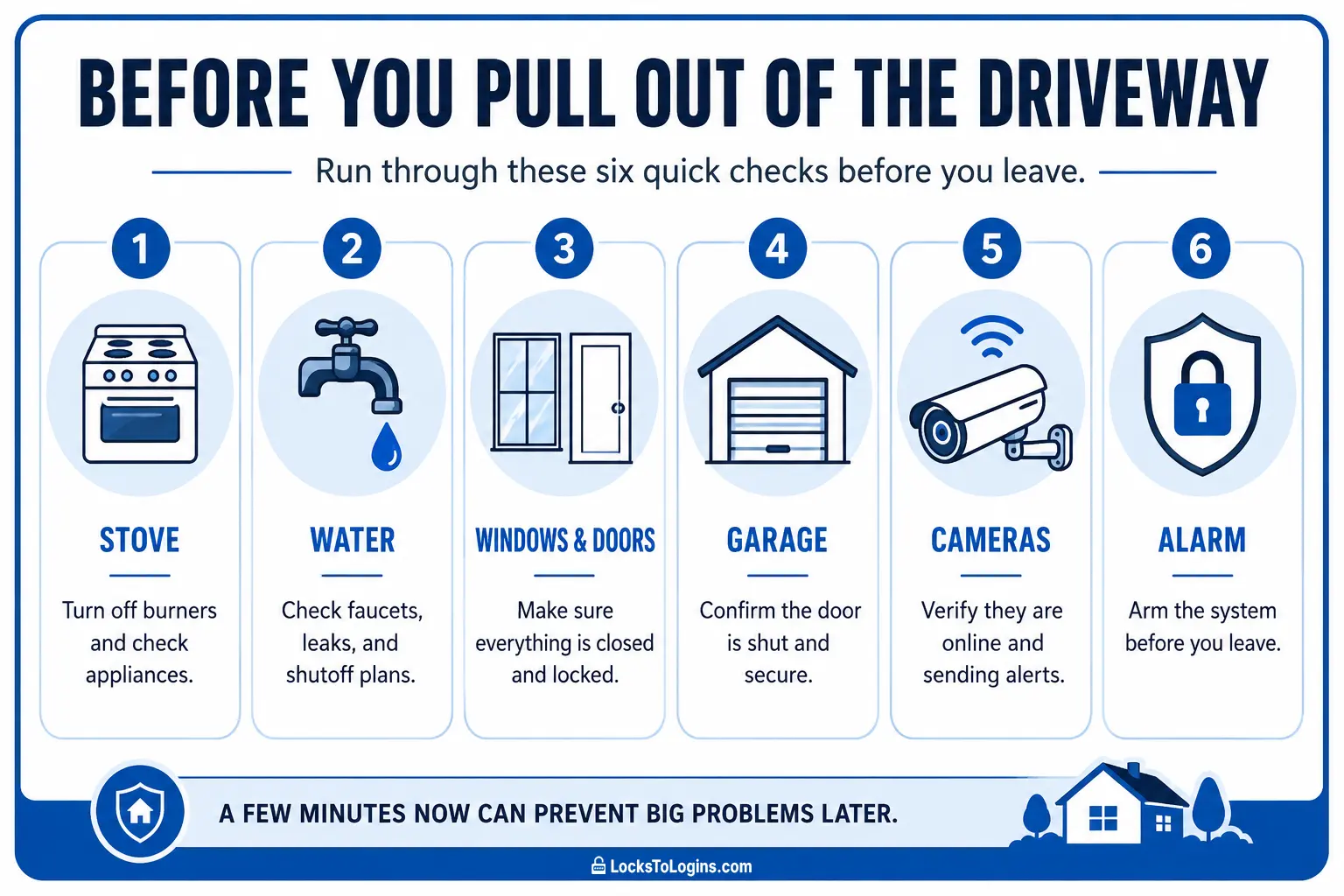
Start in the kitchen:
- Check the stove and oven.
- Confirm small appliances are unplugged.
- Clear counters and remove remaining perishables.
- Remove trash.
- Make sure the dishwasher is not running.
Move through the utility areas:
- Check for water leaks.
- Confirm the sump pump and leak sensors are online.
- Verify the thermostat setting.
- Confirm the router and smart-home hub are online.
Walk the perimeter from inside:
- Check each window and exterior door.
- Verify sliding-door rods or security bars are in place.
- Confirm garage and service doors are closed.
- Check that ladders, tools, and outdoor equipment are secured.
Finish with your security system:
- Confirm lighting and vacation routines are active.
- Check cameras and notifications.
- Arm the alarm.
- Confirm smart locks report as locked.
- Close and verify the garage door.
- Confirm pet, plant, and house-sitter instructions have been sent.
- Lock the final exterior door.
Pro Tip: If you are someone who always wonders 10 minutes after leaving whether you closed the garage door or turned off the stove, snap a quick picture with your phone before you leave. The time-stamped photo gives you proof that it was done, so you can relax and enjoy the trip.
What Changes Based on the Length of Your Trip?
A weekend away does not require the same preparation as leaving for a month.
| Time Away | Additional Steps Worth Taking |
|---|---|
| 1 to 3 days | Lock entry points, manage packages, set lighting, arm the system, and complete the final walkthrough |
| 4 to 7 days | Hold mail, arrange a local contact, manage trash day, check water risks, and plan basic yard care |
| 8 to 30 days | Schedule periodic property checks, manage lawn or snow, consider water shutoffs, test the sump pump, and prepare for weather changes |
| More than 30 days | Consider temporary mail forwarding, discuss the absence with your insurance provider, review utility and plumbing needs, and strongly consider a house sitter or scheduled inspections |
USPS Hold Mail is generally limited to 30 days, so longer trips require another mail arrangement.
Insurance policies can also define an extended absence or vacant property differently. Check your own policy rather than assuming normal coverage and requirements remain unchanged indefinitely.
Common Pre-Vacation Security Mistakes
| Common Mistake | Better Approach |
|---|---|
| Leaving one interior light on continuously | Use several lights on varied schedules |
| Closing every curtain when that is not normal | Leave window coverings in their usual positions while keeping valuables out of view |
| Hiding a spare key outside | Give it directly to a trusted person or create a temporary access code |
| Depending only on cameras | Combine cameras with locks, lighting, alarms, sensors, and local help |
| Posting an airport photo in real time | Save trip updates until after you return |
| Turning the HVAC system off | Use a safe, energy-conscious temperature setting |
| Assuming an app status means everything works | Physically test locks, cameras, sensors, and alerts |
| Leaving deliveries scheduled | Pause, redirect, or arrange immediate pickup |
| Changing passwords while walking out the door | Make changes several days early and retest every device |
| Rushing through checks from memory | Follow the same written checklist every trip |
Download the Printable Pre-Trip Security Checklist
Keep a printed copy with your luggage or save the digital version on your phone. Running through the same checklist before every trip is much more reliable than trying to remember everything while the car is packed and everyone is waiting.
Download the Free Pre-Trip Security Checklist
You can also visit the Locks to Logins Resources page for more printable home and online security tools.
Final Thoughts
Protecting your home before a vacation is not about buying every smart security device available. It is about removing easy opportunities and preparing for the problems most likely to become serious when no one is there to notice them.
Secure the obvious entry points, but do not stop there. Manage mail and deliveries, make the house look normal, test the equipment you already own, reduce water and fire risks, and give a trusted person enough information to help.
Products such as smart plugs, cameras, leak sensors, garage controllers, and secondary door locks can make these tasks easier, but they work best as part of a complete routine.
Once you turn these steps into a routine, the final check becomes faster and far less stressful. You can lock the door, leave the driveway, and focus on the trip instead of wondering what you forgot.
Explore more Home Security guides for related tips, tools, and reviews.
Home Security While on Vacation FAQs
Should I turn off my Wi-Fi router while on vacation?
Usually not. Security cameras, video doorbells, smart locks, garage controls, leak sensors, alarms, and lighting routines may depend on your home network for remote access and notifications. Leave the router and any necessary smart-home hubs powered unless you know your security equipment will continue working without them. Before leaving, confirm that your important devices are online and that alerts are reaching your phone.
What should I do if I get a security alert while I am away?
Start by checking your cameras, alarm app, or other connected devices to determine what triggered the alert. A person approaching the house, an open door, a water leak, and a low-battery warning all require different responses. If the alert shows signs of a break-in, fire, or another immediate emergency, contact the appropriate emergency services for your home’s location. A trusted local contact can help investigate non-emergency problems, but do not ask someone to confront a suspicious person.
What should my local contact check after a power outage or severe storm?
Once conditions are safe, ask them to check for exterior damage, open or damaged doors and windows, standing water, basement leaks, sump-pump problems, loss of heat or air conditioning, alarm trouble, and anything unusual around the property. They should also confirm that power, internet service, cameras, and other important systems have come back online. Give them clear instructions ahead of time about what they can handle themselves and when they should call you, a repair company, or emergency services.
Should I unplug my garage door opener while on vacation?
Usually not if the opener has a vacation-lock or remote-lock feature. Using that feature can disable normal remote operation while allowing you to keep other functions available, depending on the opener. Unplugging the opener may also disable smart controls, remote status checks, lighting, or other connected features. Regardless of how you secure the overhead door, keep the door between the garage and the house locked and remove garage-door remotes from vehicles left outside.
Should I tell the police that I will be away?
Some local police and sheriff’s departments offer vacation-watch or property-check programs, while others do not. Check your department’s official website or call its non-emergency number. Do not call 911 simply to report travel plans.
How often should someone check an empty house?
The right frequency depends on the trip length, weather, pets, property condition, and insurance requirements. For longer trips, periodic checks and visits after storms, power outages, alarms, or delivery notifications are sensible. Ask the person to look for water, temperature, power, forced entry, and exterior damage rather than only driving past.
What happens to cameras and smart locks if the internet goes down?
Most smart locks continue working locally through a keypad, fingerprint reader, or physical key, but remote control may stop. Cameras may lose cloud recording and alerts, although some models continue recording to local storage. Review your specific devices and keep a non-internet backup method for entry and alarm monitoring.
Do I need to notify my homeowners insurance company?
Probably not for an ordinary vacation, but longer absences can trigger policy requirements related to vacancy, inspections, heating, water protection, or property maintenance. Definitions and time limits vary by insurer and policy, so contact your agent before an extended trip.
Know someone heading out of town? Share this guide to help them protect their home, avoid last-minute mistakes, and leave with a little more peace of mind.

Michael Kendrick
Director of IT and former Certified Registered Locksmith with 27 years in technology and cybersecurity. Practical, everyday guidance to help you protect everything from the locks on your doors to the logins on your accounts.
Keep Learning: Related Security Guides
Package Theft Prevention: 10 Ways to Stop Porch Pirates
Package theft is often a crime of opportunity. Learn practical ways to stop porch pirates, secure your deliveries, choose safer pickup options, and know exactly what to do if a package
Outdoor Security Lighting: Placement, Types & Home Security Tips
Outdoor security lighting works best when it is placed strategically, not simply made brighter. Learn where to put motion lights, how to choose between wired and solar options, and how to
Are Smart Locks Safe? A Former Locksmith Explains
Smart locks promise keyless convenience and remote access, but how secure are they really? A former Certified Registered Locksmith breaks down what works, what doesn’t, and how to choose wisely.