
Table of Contents
Quick Answer: Yes, reputable smart locks are generally safe when the mechanical lock is properly rated, the manufacturer uses modern encrypted communication, and the account and firmware are kept secure. The greatest practical risks are weak access codes, poor account security, outdated software, and a door or frame that is physically weak.
Smart locks solve several everyday problems that traditional keys cannot. You can unlock the door with a code, check whether it was left open, give a guest temporary access, or let someone inside while you are away. That convenience is useful, but adding an app, wireless connection, and online account also creates security and privacy questions that do not exist with a standard deadbolt.
As a former Certified Registered Locksmith and current IT professional, I look at smart locks from both sides. A lock still needs strong hardware, a properly aligned door, and a reinforced frame, but it also needs secure software, dependable updates, and an account that is protected from unauthorized access.
The best smart lock is not necessarily the one with the longest feature list. It is the one that combines reliable mechanical protection with secure technology and a practical backup method when the batteries, internet, or app are unavailable.
This guide explains how smart locks work, how they can fail, what information they may collect, and what to check before installing one on your front door.
How Smart Locks Actually Work
Most smart locks connect to your home through Wi-Fi or Bluetooth. They pair with a smartphone app so you can lock or unlock your door remotely, check history logs, or share digital access with others. Some integrate with voice assistants like Alexa or Google Home for even more control.
What separates one model from another is how it handles encryption, app security, and mechanical strength. A quality smart lock combines hardened physical hardware with secure digital protocols.
Encryption, in plain terms, means the signal between your phone and your lock is scrambled so that even if someone intercepts it, they can’t read or use it.
Smart Lock Security: Physical Strength vs. Digital Protection
When it comes to safety, a smart lock must be strong both mechanically and digitally.
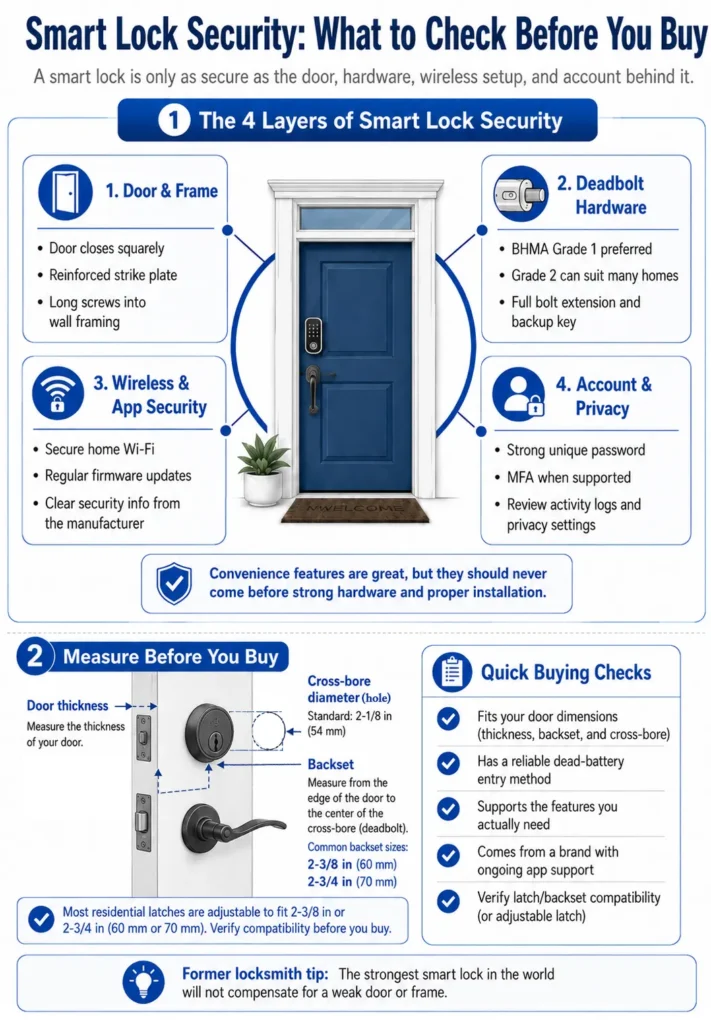
Physical security: Look for a smart lock with an ANSI/BHMA Grade 1 rating, the highest grade commonly used for residential lock hardware. Grade 1 locks must pass demanding tests for strength, durability, and reliable operation. Features such as reinforced cylinders, pick resistance, bump resistance, and tamper alerts vary by model, so verify those separately before buying.
Digital security: This is where many homeowners overlook risk. Smart locks rely on encrypted communication between your phone, Wi-Fi network, and the lock itself. Without good encryption or regular firmware updates, hackers could potentially intercept or exploit the connection.
The bottom line: a smart lock is only as secure as both its hardware build and its digital design.
The Cybersecurity and Infrastructure Security Agency recommends keeping all connected home devices updated and segregated on a dedicated network.
Pro Tip: Smart locks need routine maintenance just like any other mechanical and electronic device. Keep the firmware and mobile app updated, replace or recharge batteries before they fail, and clean the hardware as directed. Only lubricate the latch or key cylinder with a product specifically recommended by the manufacturer. Avoid using WD-40 or other general-purpose sprays, since the wrong lubricant can attract dirt, gum up the mechanism, or damage internal components.
A Former Locksmith’s Take
As a former Certified Registered Locksmith, I do not judge a smart lock by how many ways it can unlock. Fingerprint readers, voice commands, remote access, and temporary codes are useful, but none of those features can compensate for a weak door, a poorly installed strike plate, or a deadbolt that does not extend correctly.
To properly secure an entry door, start with the door and frame. Even the strongest lock will not provide much protection if either one is weak, damaged, or poorly installed. The door should close squarely without needing to be pushed, pulled, or lifted. When the deadbolt is locked, the bolt should extend fully into the strike without rubbing or binding. If the motor has to force the bolt into place, it can drain the batteries faster, wear out the lock, or prevent the deadbolt from locking completely.
The frame is just as important as the lock itself. Many residential doors use short screws that secure the strike plate only to the thin door trim. Replacing them with longer screws that reach the wall framing can make the entry much more resistant to forced entry. A high-quality smart lock installed on a weak frame is still protecting a weak point. For more ways to strengthen the entire entry, see our Door and Window Security 101 guide.
I would also prioritize legitimate BHMA-rated hardware over flashy features. Grade 1 provides the highest level of residential strength and durability, while Grade 2 can still be suitable for many homes. The rating does not guarantee that every part of the installation is secure, but it gives you a better indication that the mechanical components have passed recognized testing.
A physical backup key is another feature I strongly prefer. Apps can stop working, batteries can die, accounts can become locked, and wireless services can experience outages. USB emergency power is helpful, but a tested backup key gives you a simple way to enter without depending on another electronic device. Store the spare somewhere secure and test it before you need it.
The digital side matters too. Choose a manufacturer that provides clear security information, maintains its mobile app, and has a history of releasing firmware updates. Account protections such as multi-factor authentication are worth considering, as are privacy controls for activity logs and connected services. A smart lock may remain mechanically functional for many years, but its connected features are only as dependable as the company supporting them. For a closer look at what connected devices collect and how to limit unnecessary sharing, see our smart home device privacy guide.
My priorities, in order, would be:
- A properly aligned door and fully extending deadbolt
- A reinforced strike plate and solid door frame
- BHMA-rated mechanical hardware
- A reliable physical backup key or emergency-entry method
- A reputable manufacturer with ongoing software support
- Strong account security and sensible privacy controls
- Convenience features that fit how the household actually uses the door
Smart Locks vs. Traditional Deadbolts
A smart lock is not automatically stronger or weaker than a traditional deadbolt. Physical security depends mainly on the lock’s BHMA grade, the strength of the door and frame, and proper installation. The main differences are convenience, connectivity, maintenance, and privacy.
| Factor | Smart Lock | Traditional Deadbolt |
|---|---|---|
| Physical Security | Depends on BHMA grade and installation | Depends on BHMA grade and installation |
| Entry Methods | Keypad, app, fingerprint, voice, or key | Physical key |
| Remote Access | Available on connected models | Not available |
| Guest Access | Temporary or scheduled access codes | Requires sharing or copying a key |
| Activity History | Often available through the app | Not available |
| Maintenance | Batteries, firmware, and app updates | Occasional mechanical maintenance |
| Digital Risk | Account, app, and network security matter | No app or online account |
| Privacy | May collect account and activity data | No digital activity collection |
| Best For | Convenience, guest access, and remote control | Simplicity and minimal maintenance |
Neither option is automatically safer; lock quality and installation matter most.
What Your Smart Lock Is Quietly Recording
Most people evaluate a smart lock by how well it controls access to the door. It is also worth considering what the lock’s app records after it is installed.
Many smart-lock apps maintain an activity history. Depending on the manufacturer and your settings, this may include when the door was locked or unlocked, which access code or user was involved, whether the action occurred remotely, and which guests have been given access. Schlage, for example, says its app can show whose code was entered and at what time. Yale states that its services collect lock and unlock logs, including information about who operated the lock.
How that information is stored and retained varies by manufacturer. Yale says lock activity is kept while an account remains active and may be retained for at least 90 days after an account is deleted. Its privacy notice also explains that information may be shared with service providers, invited users, and third-party services that the customer chooses to connect.
Connecting a lock to Alexa, Google Home, a security system, a rental platform, or another smart-home service can expand the number of companies involved in processing the data. Information shared with those services is then governed by their own privacy policies, not only the lock manufacturer’s policy.
Smart-lock records may also be disclosed when required by law. Yale’s privacy notice specifically lists mandatory disclosures and law-enforcement requirements among the reasons personal information may be used or transferred. That does not mean authorities have unrestricted access, but it does mean cloud-based activity records should not be treated as information that can never leave your account.
Before choosing or configuring a smart lock, check:
- What the activity history records. Look for lock and unlock times, user identities, access-code activity, failed attempts, and remote actions.
- How long records are retained. Determine whether you can delete individual events, clear the history, or only delete the entire account.
- Whether cloud access is required. Some features may depend on the manufacturer’s servers even when the lock can still operate locally.
- What connected services receive. Review the permissions requested by voice assistants, security systems, and other integrations.
- What information is collected about guests. Guest names, contact details, access codes, and activity may also be associated with your account.
- How legal requests are handled. Look for language covering subpoenas, court orders, mandatory disclosures, and law enforcement.
None of this automatically makes smart locks a poor choice. It simply means that a connected lock can create an access history that a traditional deadbolt does not. Choose a manufacturer with a clear privacy policy, reasonable retention practices, useful deletion controls, and transparent explanations of how information is shared.
For a broader look at the information connected devices collect, our smart home device privacy guide explains what to review before adding cameras, voice assistants, locks, and other smart products to your home.
Your Wi-Fi Network Is Part of Your Lock’s Security
A smart lock is only as secure as the network it runs on. Make sure your home Wi-Fi isn’t the weak link.
The Most Common Smart Lock Mistakes Homeowners Make
Here’s where most homeowners go wrong, and the fixes are usually simple:
- Using weak PINs or default passwords on the lock’s keypad or companion app
- Using a weak or reused password for the lock’s mobile app or online account
- Failing to enable multi-factor authentication when the app or account supports it, which adds another verification step if someone steals or guesses the account password.
- Skipping firmware updates that patch known vulnerabilities
- Buying low-quality, untested brands
- Overlooking the importance of securing your home Wi-Fi network, which is the foundation of every connected smart device. (Learn how in Lock Down Your Home Wi-Fi)
Smart locks are not inherently unsafe. They simply require you to treat them like any connected device: configure them properly and keep them updated.
What Happens When the Power or Wi-Fi Goes Out?
This is one of the most common questions people have before buying a smart lock, and it’s a good one.
Most smart locks run on AA or AAA batteries, not your home’s electrical system, so a power outage won’t lock you out. Battery life typically ranges from six months to a year depending on usage, and most locks will alert you in the app when the battery gets low. Some models, like the TP-Link Tapo DL110 mentioned below, use a rechargeable battery instead.
Wi-Fi outages are a different story for remote access. If your internet goes down, you generally lose the ability to control the lock from outside your home through the app. However, you can still use the keypad, fingerprint reader, or a physical key backup to get in. The lock itself keeps working locally even when the cloud connection is unavailable.
The takeaway: always maintain a physical key backup, and make sure your lock model supports keypad or fingerprint entry as a fallback.
For a broader look at how to keep your home secure when systems fail, see our Door and Window Security 101 guide.
A Quick Note on Smart Lock Installation
Most smart locks are designed as DIY installs and take about 15 to 30 minutes with a screwdriver. You do not need a locksmith. That said, if your door is misaligned, has a non-standard bore size, or you’re replacing a multipoint lock system, it’s worth getting a professional opinion before you buy.
Smart Lock Examples
These are examples of established smart locks with useful security features, not hands-on rankings of every model. Specifications were verified through current manufacturer documentation, but app quality, firmware support, and available features can change. Always check current reviews before purchasing, as firmware and app quality can fluctuate.
1. Schlage Encode Smart Wi-Fi Deadbolt
Built-in Wi-Fi with no hub required. ANSI Grade 1 hardware, touchscreen keypad for PIN codes, auto-lock, and tamper alarm. Works with Alexa and Google Assistant. Available in several trim styles and finishes. Check availability
2. TP-Link Tapo DL110 Smart Wi-Fi Deadbolt
A feature-rich smart deadbolt with six entry methods: fingerprint, keypad, the Tapo app over Wi-Fi, local Bluetooth, compatible smart assistants, and backup keys. TP-Link rates the fingerprint reader at under 0.5 seconds and allows storage of up to 100 fingerprints. Its removable 10,000 mAh battery is rated for up to one year per charge, depending on settings and usage, and recharges through USB-C. It also supports one-time and scheduled guest codes, automatic locking, failed-attempt lockouts, real-time alerts, and detailed access logs. The exterior assembly is IP65 weather-resistant, and the lock carries a BHMA Grade 2 certification. Check availability
3. Ultraloq U-Bolt Pro Wi-Fi Smart Lock
An advanced 8-in-1 keyless entry lock with fingerprint ID, keypad access, smartphone app control, and mechanical key backup. Connects directly to Wi-Fi (no hub required) and integrates with Alexa, Google Assistant, SmartThings, and IFTTT. Includes a door sensor for auto-locking, door-left-open alerts, and detailed access logs. Built to ANSI Grade 1 standards with an IP65 weather-resistant exterior, it’s designed for both strength and durability. Check availability
| Lock | Connectivity | Entry Methods | ANSI/BHMA Grade | Battery | Supports Account MFA | Dead-Battery Access |
|---|---|---|---|---|---|---|
| Schlage Encode | Wi-Fi | Keypad, App, Voice, Key | Grade 1 | AA | No | Key |
| TP-Link Tapo DL110 | Wi-Fi + Bluetooth | Fingerprint, Keypad, App, Voice, Key | Grade 2 | Rechargeable USB-C | Yes | Key & USB Power |
| Ultraloq U-Bolt Pro | Wi-Fi | Fingerprint, Keypad, App, Voice, Key | Grade 1 | AA | Yes | Key & USB Power |
Specifications verified July 2026; features may change.
Pro Tip: Do not judge a smart lock by its feature list alone. Check whether the manufacturer publishes clear security information, offers multi-factor authentication for its app or account, and has a history of releasing firmware and app updates. Strong hardware matters, but long-term software support is what keeps a connected lock secure after installation.
What to Check Before You Buy a Smart Lock
A good smart lock needs more than an attractive keypad and a long feature list. Before purchasing, compare these areas:
- BHMA security grade: Grade 1 provides the highest residential security rating, while Grade 2 is suitable for many standard residential doors.
- Account security: Prefer an app or online account that supports multi-factor authentication.
- Software support: Look for a manufacturer with a history of releasing firmware and app updates.
- Backup access: Confirm that the lock includes a physical key, external USB power, or another reliable way to enter if the battery dies.
- Door compatibility: Check the required door thickness, bore diameter, backset, and clearance before ordering.
- Privacy controls: Review what activity the app records, how long the information is retained, and which connected services can access it.
- Subscription requirements: Determine whether remote access, activity history, alerts, or other features require a paid plan.
The best choice is a lock that fits your door, provides strong mechanical security, and continues receiving software support after installation.
Are Smart Locks a Good Fit for Renters?
If you rent your home, smart locks can still work for you, but with some important caveats. Most smart locks replace the existing deadbolt, which typically requires your landlord’s permission. Some renter-friendly options sit over your existing deadbolt on the interior side and do not require drilling, though these tend to have more limited features.
If you own your home, there are no restrictions. Just make sure the lock you choose fits your door’s existing bore hole and backset measurements before you buy. Most major brands fit standard US door preparations.
For more renter-focused options, see our guide on home security for renters that apply whether you own or rent.
Smart Lock Security Checklist
Before you consider your smart lock fully set up, run through this quick list:
- Changed the default admin password in the app
- Reviewed the app’s account-security settings and enabled every available protection, including multi-factor authentication
- Set up auto-lock so the door never stays unlocked by accident
- Registered for firmware update notifications
- Confirmed your physical key backup works
- Checked that your home Wi-Fi network uses WPA2 or WPA3 encryption
- Reviewed which third-party platforms your lock is connected to
Smart Lock Bought? Now Check Your Privacy Settings
Your smart lock may record when the door is used and who accessed it. Learn what your connected devices are sharing and how to manage them.
Final Thoughts
Smart locks are neither a magic solution nor a gimmick. Their security depends on the same fundamentals as any other exterior lock: a solid door, a reinforced frame, properly rated hardware, and correct installation. The added convenience only works in your favor when the app, account, Wi-Fi network, and firmware are also kept secure.
The best smart lock is not necessarily the model with the most features. It is the one that fits your door, locks reliably every time, provides a dependable backup-entry method, and comes from a manufacturer that continues supporting its software.
Choose carefully, install it correctly, and keep both the physical and digital sides maintained. When those pieces are in place, a smart lock can be a practical security upgrade rather than just another connected gadget.
Explore more Home Security guides for related tips, tools, and reviews.
Smart Locks FAQ
Are smart locks safer than traditional locks?
Smart locks can be as secure as traditional deadbolts when they use properly rated mechanical hardware and are installed correctly. They may also provide useful protections such as automatic locking, access alerts, and temporary codes. However, they introduce additional account, software, network, and privacy considerations that traditional deadbolts do not have.
Can smart locks be hacked?
Smart locks can potentially be compromised, but attacks against reputable, properly maintained models are uncommon. More practical risks include weak access codes, reused account passwords, outdated firmware, insecure Wi-Fi, and unauthorized access to the companion account. Choose a reputable manufacturer, keep the lock and app updated, and enable all available account protections.
What happens if my Wi-Fi goes down?
You lose remote app access, but the lock itself still works. You can use the keypad, fingerprint reader, or a physical key backup to get in locally. Wi-Fi outages do not disable the lock.
What happens if the battery dies?
Most smart locks provide low-battery warnings before they stop working. If the battery dies, the available backup method depends on the model and may include a physical key, external USB power, 9-volt battery contacts, or another emergency-power option. Verify the backup-entry method before purchasing.
Do smart locks work with Alexa or Google Home?
Most major brands do, yes. The Schlage Encode, TP-Link Tapo DL110, and Ultraloq U-Bolt Pro all support Alexa and Google Assistant for voice commands like locking the door. Unlocking via voice is usually restricted for security reasons.
Can a landlord install a smart lock on a rental?
Yes, but renters typically need permission to replace the deadbolt. Some renter-friendly smart locks sit over the existing interior hardware and do not replace the deadbolt, avoiding the permission issue while still adding keypad or app access.
How do I know if a smart lock is good quality?
Look for an ANSI/BHMA Grade 1 or Grade 2 rating, clear information about the manufacturer’s security practices, a dependable backup-entry method, and a history of providing firmware and app updates. Also review the app’s reliability, privacy controls, account-security options, warranty, and long-term manufacturer support.
Do smart locks require a monthly subscription?
No. Most smart locks do not require a monthly subscription for basic features such as keypad entry, app control, and local access. A subscription may be required for optional cloud features or when the lock is included in a professionally monitored home security package with cameras, sensors, and other connected equipment.
Smart locks can add convenience and security, but setup and maintenance matter. If this guide helped, share it with someone considering a smart lock.

Michael Kendrick
Director of IT and former Certified Registered Locksmith with 27 years in technology and cybersecurity. Practical, everyday guidance to help you protect everything from the locks on your doors to the logins on your accounts.
Keep Learning: Related Security Guides
Video Doorbells 101: What to Know Before You Buy
Video doorbells can do much more than show you who is at the door, but the right model depends on your wiring, Wi-Fi, storage, subscriptions, and porch layout. This guide explains
Smart Home Device Privacy: What They Collect and How to Stop It (2026)
Smart home devices are convenient, but they can also be surprisingly chatty. From voice assistants to robot vacuums, here is what your devices actually collect, who sees that data, and practical
Home Wi-Fi Security: 10 Steps to Lock Down Your Network (2026)
A few small changes can make a big difference in your Wi-Fi security. Learn how to protect your home network, boost performance, and keep cybercriminals out with these practical steps.