
Table of Contents
Quick Answer: To freeze your credit, place a free security freeze with Equifax, Experian, and TransUnion to prevent most lenders from accessing your credit report and make it much harder for criminals to open new accounts in your name. A credit freeze does not hurt your credit score or affect existing accounts, and you can temporarily lift it whenever you need to apply for credit. For more complete protection, there is also a fourth credit bureau that many people overlook when freezing their credit.
If your personal information has been exposed in a data breach or your identity has been stolen, one of the most powerful moves you can make is to freeze your credit. It costs nothing, it takes just a few minutes, and it puts a hard block between criminals and your financial life. This guide walks you through exactly what a credit freeze does, when to use one, and how to set it up at all three major bureaus today.
Should you Freeze Your Credit?
The short answer for most people is yes, and sooner than you think. You do not have to be an identity theft victim to benefit from a credit freeze. Even as a purely proactive step it is one of the easiest protections you can put in place.
Many people delay because they assume a credit freeze will seriously complicate their financial life. In practice, the inconvenience is usually limited because you can temporarily lift the freeze whenever you need to apply for credit, then let it go back into place afterward.
What is a Credit Freeze?
A credit freeze, also called a security freeze, is a free tool that restricts lenders from accessing your credit report. Since most banks and lenders will not approve new credit without checking your report, this makes it nearly impossible for criminals to open new accounts in your name. Think of it like putting a padlock on your credit file. Nobody can open it without the key, and you control the key.
A few important things to know:
- It does not affect your credit score
- It does not stop fraud on existing accounts
- You can temporarily lift or remove the freeze when needed
- It lasts indefinitely until you lift it
- Each person in your household needs their own freeze
When you should freeze your credit
You should consider freezing your credit if:
- Your identity has been stolen
- Your Social Security number was exposed in a breach
- Your wallet was lost or stolen
- You see unfamiliar accounts or credit checks
- A company notifies you of a data breach
- You receive notification that someone filed taxes in your name
- You get bills for medical services you never received
If you are unsure, freezing your credit first and evaluating your situation afterward is often a reasonable precaution.
If you think your email account may have been compromised as part of identity theft, check out our guide on How to Tell If Your Email Has Been Hacked before proceeding.
How to Freeze Your Credit at the Three Major Bureaus (Plus Innovis)
How to freeze your credit (step by step):
- Go to Equifax.com and create an account or log in. Do this one first since it takes the longest.
- Verify your identity using your name, Social Security number, date of birth, and address.
- Submit your freeze request and save your PIN or account password somewhere secure like a password manager.
- Repeat the same process at Experian.com.
- Repeat again at TransUnion.com.
- For added protection, consider freezing your Innovis credit report as well.
The whole process takes about ten minutes. Credit freezes are free at Equifax, Experian, and TransUnion, and Innovis also offers its security freeze for free.
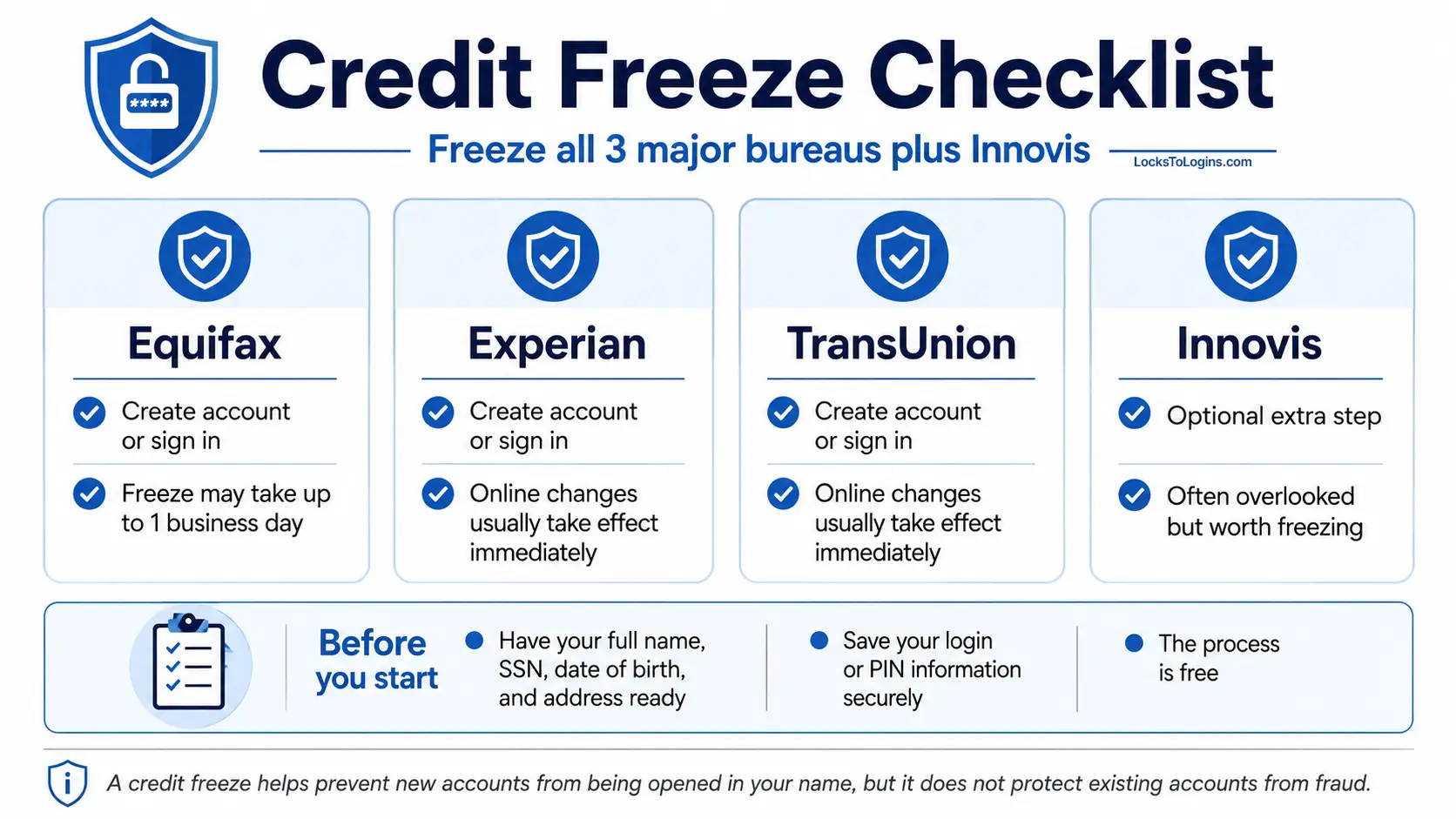
Equifax
Go to equifax.com. You will create an account or log in if you already have one. Equifax may take up to one business day to apply the freeze, so do this one first.
Experian
Go to experian.com. Experian lets you place and manage your credit freeze online through your account, and changes made through its online freeze service typically take effect immediately.
TransUnion
Go to transunion.com. TransUnion also applies the freeze immediately and lets you manage everything through their online account.
MOST PEOPLE MISS THIS
Innovis: The Fourth Bureau
Innovis is a fourth credit reporting bureau that most people have never heard of, and most guides never mention. Some lenders do check it, which means leaving it unfrozen is an unnecessary gap in your protection. Freezing it is free and takes about two minutes. Visit innovis.com and add it to your list while you are already in freeze mode.
What information you will need
Before you start, gather the following:
- Full name
- Social Security number
- Date of birth
- Current address and previous addresses from the last two years
- Email address
- Phone number
You may also be asked identity verification questions based on your credit history, like which bank issued your car loan or which street you lived on in a certain year.
How long does it take to freeze or unfreeze your credit?
For Equifax, Experian and TransUnion, an online or phone freeze request must be completed within one business day, and an online or phone request to lift a freeze must be completed within one hour. Mailed requests must be completed within three business days. Experian says changes made through its online freeze service happen in real time. Innovis says its freezes are typically added within three business days after receiving and verifying a request.
Save your freeze account access
Each credit bureau handles freeze access a little differently. Depending on the bureau, you may manage your freeze through an online account, password, PIN, or another identity verification method. Whatever method is used, make sure you know how to get back into your account before you need to lift the freeze.
Save your login information or PIN in a secure place, preferably a password manager. If you lose access, you can usually recover it by verifying your identity again, but that can take longer and may require additional documentation.
What happens after you freeze
Once your credit is frozen:
- Most lenders cannot access your frozen report for a new credit application.
- Your existing accounts continue working normally.
- You can still access and review your own credit reports.
- Current creditors, certain government agencies, and credit-monitoring services may still access your report.
- Pre-approved credit and insurance offers may still arrive unless you opt out separately.
You can still use your current credit cards, make payments, and access your bank accounts. The freeze only blocks new credit applications.
Prepare Before You Need To
A credit freeze is a great first line of defense, but it works best as part of a bigger picture. One of the smartest things you can do right now while nothing is wrong is to get your key information organized and ready.
We put together a free two-page resource for exactly this. The Identity Theft and Fraud Response Sheet has space to document your financial institution emergency numbers, credit bureau contacts, government agencies that handle identity theft, insurance information, and more. Fill it out, keep a copy somewhere accessible, and you will be ready if you ever need it.
Credit freeze vs fraud alert
A fraud alert tells lenders to take extra steps to verify your identity. It is easier to set up, but it is also weaker because it does not fully block access. A credit freeze is stronger because it prevents access entirely unless you unlock it.
Here is how they compare:
| Feature | Credit Freeze | Fraud Alert |
|---|---|---|
| Blocks access to credit report | Yes | No |
| Lasts | Until you lift it | 1 year (or 7 years for identity theft victims) |
| Requires setup at each bureau | Yes | No, one bureau alerts the others |
| Best for | Active identity theft | Suspected risk or precaution |
Many people choose to start with a freeze after identity theft, then decide later if they want to keep it long term.
Credit Freeze vs Credit Lock
A credit freeze and credit lock both restrict access to your credit report, but a security freeze is protected by federal law and is free to place and lift. Credit locks are bureau products that may be free or bundled with paid services, so you do not need to pay for a lock just to get the protection a free security freeze already provides.
How to temporarily unfreeze your credit
If you need to apply for credit, you can temporarily unfreeze your report. You have two options:
Temporary lift
Unfreeze for a set period of time, like one day or one week. This is useful when you know exactly when you will be applying for credit.
Lift for a specific creditor
Some bureaus also let you unfreeze for a single lender only rather than a set time period, though this option is not available everywhere. Either way, the process is done online or by phone using the PIN or account you created and usually takes just a few minutes. Once the temporary period ends the freeze reactivates automatically. You do not need to do a thing.
Pro Tip: Before lifting any credit freezes, ask the lender which credit bureau they plan to check. You may only need to temporarily lift the freeze at one or two bureaus instead of opening all of them.
What if you lost your PIN or account access?
If you lose your PIN or forget the password you set up, do not worry. Each bureau has an account recovery process. You will need to verify your identity again, which may involve answering security questions, uploading a copy of your ID, or receiving a verification code by mail. It takes longer than a normal unfreeze, so keeping your credentials saved in a password manager from the start is the best way to avoid the headache.
How to Permanently Remove a Credit Freeze
Permanently removing a credit freeze is just as straightforward as placing one. Log in to your account at each bureau or call them by phone, verify your identity using your PIN or account credentials, and request the freeze be lifted permanently.
Once removed, lenders can access your credit report again just as they could before the freeze was in place. There is no waiting period and no impact on your credit score either way.
Before you remove it permanently, ask yourself whether a temporary lift might be the better option. If you are just applying for one loan or one credit card, lifting it temporarily at the bureau the lender uses makes more sense than removing your protection entirely. You can always refreeze, but it means going through the process again at each bureau where you previously placed a freeze.
Downsides and limitations
A credit freeze is powerful, but it is not perfect.
You must temporarily unfreeze your credit when applying for:
- Loans
- Credit cards
- Some apartment rentals
- Certain background checks
- Utilities in some states
- Cell phone plans with financing
It also does not protect you from:
- Phishing attacks
- Existing account fraud
- Tax or medical identity theft
- Someone using your debit card
- Account takeovers where criminals change your passwords
This is why freezing your credit should be just one part of your overall identity protection plan. For a full overview of how to protect yourself, read our Identity Theft 101: Identity Protection Starter Guide.
What about your children
If your child is under 16, you can request a free credit freeze on their behalf. Teens who are 16 or 17 can request and remove their own security freeze. Child identity theft is a growing problem because it often goes unnoticed for years.
Pro Tip: Do not assume a child without an established credit history has nothing to freeze. You can still request a credit freeze for a minor to help prevent someone from opening accounts in their name.
The process is similar but requires proof of identity for both you and your child. Each bureau has slightly different requirements, so check their websites for details.
Other consumer databases to consider freezing
Beyond the three major credit bureaus, there are two other consumer reporting systems that some people freeze after identity theft.
ChexSystems is used by many banks when you open a new checking or savings account. If a criminal tries to open a bank account in your name, ChexSystems may be consulted. You can place a security freeze on your ChexSystems consumer report to restrict access to that information.
NCTUE is the National Consumer Telecom and Utilities Exchange. Some utility companies and cell phone carriers check this when you set up new service. You can freeze it at nctue.com.
Neither of these is required, but if you want the most complete protection possible, they are worth a look.
Additional steps to take after identity theft
Freezing your credit is an important step, but it should not be the only one.
If your identity has been stolen, you should also:
- Change passwords on all important accounts, especially email and banking
- Enable two-factor authentication everywhere it is available
- Monitor your bank and credit card statements for unauthorized charges
- File a report with the Federal Trade Commission at IdentityTheft.gov
- Consider filing a police report to create an official record
- Check your credit reports for unfamiliar accounts
- Set up fraud alerts or credit monitoring if you want an extra layer of notification
Scammers often target identity theft victims with follow-up scams, so stay vigilant. If you are unsure whether an email or text is legitimate, review our guide on How to Spot Scam Emails.
Final thoughts
A credit freeze is one of the most effective tools you have after identity theft. It is free, it is fast, and it gives you control over who can access your credit report.
The peace of mind alone makes it worth the few minutes it takes to set up. You do not need to be a security expert to protect yourself. You just need to take action.
Remember that identity theft is not a reflection of something you did wrong. Data breaches happen to major companies all the time. Your information can be exposed through no fault of your own. What matters is how you respond.
If your information has been compromised, do not wait. Go freeze your credit at Experian, Equifax, and TransUnion today. It takes about ten minutes total and costs nothing. Then work through the rest of your identity protection plan one step at a time.
You Froze Your Credit. Is Your Identity Actually Safe?
A credit freeze is just one piece of the puzzle. For a broader look at identity protection, start with our Identity Theft 101 Starter Guide.
Credit Freeze FAQ
Does freezing my credit cost money?
No. Credit freezes are free by law at all three bureaus.
How long does it take to freeze your credit?
The three major credit bureaus must generally complete an online or phone freeze request within one business day. Online or phone requests to lift a freeze must generally be completed within one hour, while mailed requests can take up to three business days after they are received.
Will anyone notify me if someone tries to access my frozen credit?
No. A credit freeze silently blocks access without notifying you. If you want active alerts, pair your freeze with a credit monitoring service, which will notify you of changes to your report.
Can I still check my own credit report?
Yes. You can still request your free annual credit report from AnnualCreditReport.com or access your credit through your bank or credit card company.
Do I need to freeze all three bureaus?
Yes. Equifax, Experian, and TransUnion do not share freeze requests, and lenders may check different bureaus. You should place a separate freeze with all three major bureaus, and you can also consider freezing your Innovis report for additional protection.
Can I freeze my credit online or do I have to call?
You can do it entirely online at each bureau’s website. Online is the fastest method and the freeze takes effect immediately in most cases. Phone and mail options are also available if you prefer.
Should I freeze my credit even if I have not experienced identity theft?
A credit freeze is a strong preventive step that blocks criminals from opening new accounts in your name, even if your data is exposed in a future breach. Since it is free and easy to lift when needed, many people keep their credit frozen long term for extra protection.
Does a credit freeze stop all types of identity theft?
No. A credit freeze primarily helps prevent criminals from opening new credit accounts in your name. It does not stop fraud on existing accounts, phishing, account takeovers, tax identity theft, or medical identity theft, so it should be used as part of a broader identity protection plan.
A credit freeze is one of the simplest ways to help protect yourself from identity theft, yet most people still have not set one up. If this guide helped make it easier to understand, share it with someone who could use the extra protection.

Michael Kendrick
Director of IT and former Certified Registered Locksmith with 27 years in technology and cybersecurity. Practical, everyday guidance to help you protect everything from the locks on your doors to the logins on your accounts.
Keep Learning: Related Security Guides

How to Tell If Your Email Has Been Hacked
Think your email has been hacked? Here are the 10 warning signs to watch for, how to confirm a breach, and the exact steps to secure your account before a hacker

Two-Factor Authentication 101: Your Second Line of Defense
Two-factor authentication (2FA) explained in plain language. Learn what it is, how it works, which method is strongest, and how to set it up on your most important accounts in minutes.

Identity Theft 101: How to Protect Yourself
Identity theft affected over 1.1 million Americans in 2024 alone. This plain-English guide explains how identity theft happens, the warning signs to watch for, and the exact steps you can take