
Table of Contents
We invite them into our homes, trust them with our routines, and share our lives with them without a second thought. Then they go around sharing our secrets with who-knows-who online. No, not the in-laws. We are talking about your smart devices.
These conveniences come with a trade-off that many people overlook. From voice assistants to smart locks, many smart home devices collect and share far more data than people realize. Over time, all those small bits of information can build a surprisingly detailed picture of your daily life, and not all of it stays with the company that made your device.
This guide covers what is actually being collected, who sees it, and the straightforward steps you can take to keep your home life private.
The Quiet Conversations Happening Behind the Scenes
Every time you talk to your voice assistant, unlock your smart door, or adjust your thermostat, a quiet conversation starts behind the scenes. That command or button press does not stay in your home. It gets sent out to a cloud server somewhere, which is basically a remote computer owned by the company that made your device.
All that data helps make your devices smarter, but it also means your daily habits are being stored and analyzed far from your living room. Over time, those little snippets of data can reveal a lot about your life.
They can show when you are home and when you leave, how often doors open or lights turn on, and which rooms see the most activity. Some systems even analyze voice patterns or the phrases you tend to use.
It might sound harmless, but when you add all that up, these devices start to know you almost better than you know yourself. And just like any good gossip, they don’t always keep that information to themselves.
What Your Smart Devices Are Actually Collecting
Smart home devices collect several categories of data depending on the device type: voice recordings, viewing history, location patterns, floor plan maps, entry and exit logs, and usage schedules. Most of this data is stored on manufacturer cloud servers where it may be shared with advertising partners, used to improve products, or accessed by employees under certain circumstances.
Here is a breakdown of the kinds of data commonly collected by device type:
| Device Type | What It Typically Collects | Where It Goes |
|---|---|---|
| Voice assistants | Voice recordings, wake word activations, command history | Manufacturer cloud servers; may be reviewed by employees |
| Smart TVs | Viewing history, ACR data, app usage | Advertisers and data brokers via the manufacturer |
| Smart thermostats | Home/away schedule, temperature preferences, occupancy patterns | Manufacturer cloud; sometimes shared with energy partners |
| Robot vacuums | Floor plan maps, cleaning schedules, room layout | Manufacturer cloud; some models have shared with third parties |
| Video doorbells | Motion events, facial data, license plates, continuous footage | Manufacturer cloud; may be shared with law enforcement |
| Smart locks | Entry/exit timestamps, user profiles, remote access logs | Manufacturer cloud and linked smart home platforms |
| Smart plugs (budget) | Usage patterns, on/off schedules | Often unencrypted; varies widely by brand |
For a deeper look at two of the most data-heavy devices on that list, our Video Doorbells 101 guide and our smart locks purchasing guide cover what to look for before you buy and how to configure both for better privacy once you do.
Put it all together and you have a surprisingly complete picture of your daily life: when you wake up, when you leave, what you watch, how often people come and go, and what your home looks like inside. And that is just from the devices most people already own. The more connected your home becomes, the more complete that picture gets.
You can also protect the physical cards in your wallet from wireless scanning. See our RFID blocking wallet guide for a realistic look at when it matters.
The Biggest Gossips in the House
Smart devices rarely keep things between you and them. When your data leaves your home, it often travels through several layers of companies, partners, and cloud systems. Each one might get a peek at what your devices collect.
Manufacturers say this sharing helps improve products or personalize your experience. In plain terms though, it often means your data can be used to target ads, build marketing profiles, or train algorithms. In some cases, companies share information with outside partners or store it in third-party data centers, which are facilities run by completely separate companies.
It is a bit like your smart speaker chatting about you with all its friends. Your camera might tell your cloud app when motion was detected. Your thermostat reports when you are home. Your smart lock sends updates about entries and exits. One gadget’s status update can easily become another’s conversation starter. In some cases that data ends up with data brokers, which are companies that buy, compile, and sell personal information, often without consumers ever knowing it happened.
The more connected your devices are, the more places your personal information can end up. And in that busy digital social circle, privacy often gets left out of the group chat.
How That Data Can Be Used Against You
Most people assume the worst case is getting targeted ads. But the picture is more detailed than that once you zoom out.
Insurance companies have begun exploring whether smart home data, including things like how often you are home, temperature patterns, or motion sensor activity, could one day factor into home or life insurance pricing. This is not theoretical. A handful of insurers already offer premium discounts for customers who share data from connected devices, which means the flip side is being penalized for choosing not to share.
Divorce and custody proceedings have also seen smart home data introduced as evidence, including voice assistant logs and camera footage. Your devices keep records even when you forget they are keeping records.
Law enforcement requests for smart home data have increased significantly over the past several years. Most major platforms will comply with a valid legal request, and some have done so even without one. Your home is private, but the data it generates sits on servers that are not.
None of this is meant to alarm you. Most people will never experience any of these scenarios. But knowing that your data has real-world value to parties other than advertisers is a good reason to be a little more intentional about what your devices are allowed to collect.
Local Processing vs. Cloud: Why It Matters for Privacy
Most smart devices send your data to a remote server to do their thinking. That is called cloud processing, and it is how the majority of voice assistants, cameras, and smart home hubs work. Your command or video clip leaves your home, gets analyzed on a company’s server, and a response comes back. Common smart home hubs like Amazon Echo, Google Nest Hub, and Apple HomePod all work this way by default, though how much data each one sends and stores varies by brand and settings.
Some newer devices handle more of that processing directly on the device itself, which is called local or edge processing. The difference matters for privacy because data that never leaves your home cannot be exposed in a breach, subpoenaed by law enforcement, or shared with advertising partners.
If privacy is a priority for you, look for devices that advertise local processing or work with platforms like Home Assistant. Home Assistant is an open-source home automation system that keeps your data on a device inside your house rather than in someone else’s cloud. It takes a bit more setup, but you trade convenience for control.
When Privacy Promises Did Not Hold Up
These are not just hypothetical risks. There have been real, documented cases where smart device data ended up somewhere it should not have:
In 2019, it came out that Amazon, Apple, and Google all had human contractors listening to voice assistant recordings as part of their quality review programs. Most users had no idea their conversations could reach a real human ear. Amazon has since made it easier to opt out, but the default was always collection first.
Ring, Amazon’s video doorbell brand, faced significant scrutiny after it was revealed that the company had shared customer camera footage with law enforcement in response to requests, sometimes without requiring a warrant. Ring has since updated its policies, but it sparked a real debate about who actually controls your camera footage.
In 2021, security researchers discovered that some iRobot Roomba models had captured and shared photos from inside customers’ homes, including images of people, during product development testing. The photos ended up accessible to outside data labeling contractors.
Wyze, a popular budget camera brand, experienced a data breach that exposed information for millions of users. A separate incident also resulted in some users briefly seeing footage from other people’s cameras due to a caching error. And that kind of exposed data does not just sit idle. It increasingly ends up fueling AI-powered scams that are far more convincing than anything that came before them.
What Happens When a Company Gets Sold or Shuts Down?
One risk that rarely gets mentioned is what happens to your data when the company behind your device gets acquired, goes out of business, or simply decides to shut down its cloud service. Your smart home data does not disappear with the company. It typically gets transferred to whoever acquires the business, often under terms that look very different from the original privacy policy you agreed to. This has already happened with several smart home brands. When you buy a connected device, you are also trusting that company to exist, stay independent, and keep its promises for as long as you own the product. That is worth factoring in when you choose who makes the things in your home.
None of these companies set out to harm their customers. But these cases show that even well-intentioned products can expose your data in unexpected ways, whether through a breach, a policy change, or a corporate sale. Once information leaves your home, you have very little say in what happens to it.
When the Gossip Reaches the Wrong Ears
Every piece of information your devices collect has value, and hackers know it. Weak passwords, unpatched software, or unsecured Wi-Fi networks can turn your helpful gadgets into easy entry points for cybercriminals. This is why IoT (Internet of Things) device security matters just as much as the security software on your laptop. IoT simply means the internet-connected devices in your home, everything from your thermostat to your doorbell camera.
Some of the most common weak spots include:
- Cloud-based cameras that lack strong encryption
- Smart locks running outdated firmware
- Devices that connect over open or public Wi-Fi networks
- Smart device accounts protected by weak or default passwords
Not sure if your passwords are strong enough? Our Password Security 101 guide explains how to create and manage strong ones.
A single exposed device can reveal when you are home, when you are away, or what your daily routines look like. In the wrong hands, that information is more valuable than most people think.
If a device breach leads to exposed personal information, our Identity Protection 101 guide walks through how to respond.
The Easiest Way to Fix Your Password Problem
Managing strong unique passwords for every smart device and account is a lot easier with a password manager. We broke down how they work and which ones are worth using.
A Note for Renters: When You Did Not Choose the Device
Landlord-installed smart devices are becoming more common, including smart locks, video doorbells, and thermostats. If you are renting, you may not have chosen these devices or agreed to their data collection practices. That creates a tricky situation.
Having spent years working directly with physical lock systems before connected locks existed, one thing stands out: a traditional deadbolt does not phone home. A smart lock does, and the access log it maintains is more detailed than most homeowners realize.
At a minimum, ask your landlord which devices are installed, who manages the accounts, and whether they have access to any recorded data. If a smart lock is present, find out whether the landlord can see entry logs. You have a right to know what is monitoring your space, even if you do not own it.
For devices you can control, like your own Wi-Fi router or personal gadgets, the steps in the next section still apply and are worth doing.
A Word About Smart Devices and Kids
If children use your voice assistant, watch TV on a smart TV, or play games on connected devices, there is an extra layer of privacy worth thinking about. As a father of three, I can tell you that smart device privacy around kids is something I think about more than the average person, and it is worth your attention too.
Voice assistants can pick up children’s voices and store those recordings just like adult commands. Smart TVs track viewing habits regardless of who is sitting in front of them.
Amazon’s Alexa and Google Assistant both offer family settings and child profiles, but those features are not turned on by default. You have to go looking for them. If kids are regular users of any smart device in your home, it is worth spending ten minutes in those settings to see what guardrails exist and which ones make sense to turn on.
Any device positioned where children spend a lot of time, whether that is a camera in a playroom or a voice assistant in a bedroom, deserves a closer look at where it stores footage or audio, who can access it, and whether the microphone or camera can be disabled when not needed.
Quick Quiz: How Privacy-Aware Is Your Smart Home?
Answer 6 questions to find out where you stand.
Question 1 of 6
Have you changed the default password on every smart device in your home?
Question 2 of 6
Do your smart devices update automatically, or do you update them manually?
Question 3 of 6
Do you have a separate Wi-Fi network just for your smart devices?
Question 4 of 6
Have you reviewed the privacy settings inside each smart device app?
Question 5 of 6
Do you delete stored voice recordings from your voice assistant regularly?
Question 6 of 6
Before buying a smart device, do you check the brand's privacy policy?
Your smart home privacy checklist:
How to Keep Your Devices from Spilling Secrets
You do not have to stop using smart gadgets to protect your privacy. You just need to make sure they know when to stay quiet. A few simple habits can help keep your data where it belongs.
- Change default usernames and passwords. Every device ships with generic login credentials that are well known to hackers. Changing them takes five minutes and makes a real difference. If you are not sure what makes a strong password or how to keep track of them all, our Password Security 101 guide is a good place to start.
- Review privacy settings. Most devices have options to limit what is shared or stored. Dig into the app settings and turn off anything you do not actively use.
- Check the app permissions on your phone. The mobile app that controls your smart device often asks for access to your location, contacts, or microphone even when the app is closed. On an iPhone, go to Settings, Privacy and Security, and review what each app can access. On Android, go to Settings, then Apps, then Permissions. Revoke anything that does not make obvious sense for what the app actually does.
- Keep everything updated. Firmware updates, which are software patches that run on the device itself, often include important security fixes. Turn on automatic updates when possible.
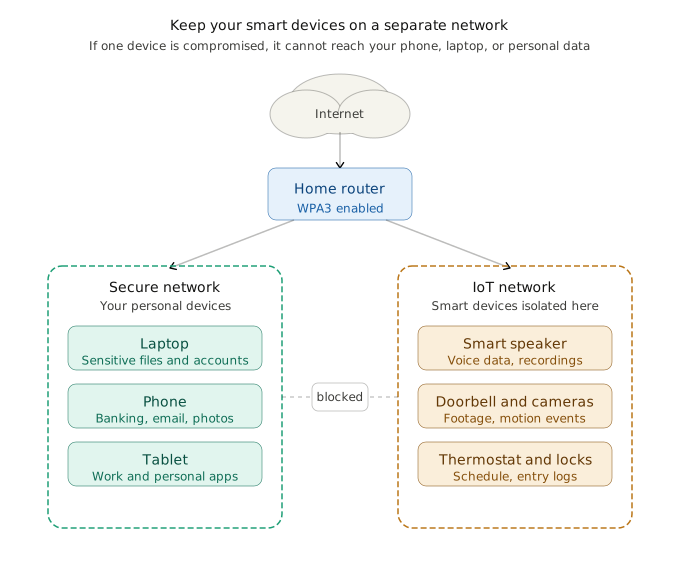
- Use a separate Wi-Fi network for smart devices. Many modern routers let you create a guest or IoT network. This keeps your gadgets isolated from your computers and phones, so if one device gets compromised, the damage stays contained. Learn how to lock down your Wi-Fi network.
- Use WPA3 security on your router if your router supports it. WPA3 is the latest Wi-Fi encryption standard and is significantly harder to crack than older versions.
- Turn off voice history or cloud backups if you can. Less stored data means less that could be exposed later.
- Disable microphones on devices when they are not needed. Some smart TVs and hubs have physical mute buttons or software options to disable the mic entirely.
- Factory reset devices before selling or disposing of them. Stored Wi-Fi passwords, account links, and access tokens can linger on a device long after you think you are done with it.
- Buy from brands with clear privacy policies. Look for companies that explain how your data is handled and give you real control over it. If a company’s privacy policy is hard to find or impossible to understand, that tells you something.
If you want visibility into exactly what your smart devices are doing and where they are sending data, the Firewalla Purple SE is the most user-friendly option we have seen for non-technical home users. It monitors network traffic, blocks unwanted connections, and does not require any complicated setup.
How to Buy Smarter: The FCC Cyber Trust Mark
If you are shopping for new smart devices in 2026, there is a new label worth looking for: the FCC Cyber Trust Mark. It is a shield logo with a scannable QR code that manufacturers can earn by meeting baseline security standards. Scan it before you buy and you can pull up information on what data the device collects, whether it receives ongoing security updates, and how long those updates are supported.
Not every product carries it yet, but it is becoming more common on name-brand devices. If a device you are considering does not carry it and also has no clear privacy policy on the manufacturer’s website, that tells you something. Budget devices from lesser-known brands are often the ones most likely to skip updates after a year or two, which leaves known security holes permanently open.
Products that carry the mark also commit to a minimum update support period, which is one of the single most important things to look for in a connected device. A smart doorbell that stops receiving security patches after 18 months is a liability, not an asset.
The mark is not a guarantee of perfection, but it is a fast, practical starting point when comparing options on a store shelf or a product listing.
Smart Home Device Privacy: Simple Steps to Stay in Control
Smart home devices are not inherently unsafe, but they do require a little attention to keep them from sharing more than you expect. Most privacy risks come down to three things: how your devices are configured, how they connect to your network, and how much data they are allowed to store. The good news is that fixing all three does not require any technical background.
Start with the privacy settings inside each device’s mobile app. Most smart devices collect data by default, including voice recordings, usage history, and activity logs, and manufacturers are not always upfront about that. Look for options that let you limit unnecessary data collection or automatically delete stored recordings on a schedule. If you cannot find those settings easily, that is worth noting.
Your home network matters more than most people realize. If your router supports it, create a dedicated Wi-Fi network just for your smart devices. This keeps them separated from your computers, phones, and anything else that holds sensitive information. If one smart device ever gets compromised, that separation helps contain the damage instead of letting it spread across everything connected to your home network.
Keeping your devices updated is just as important as how you set them up. Firmware is the software that runs directly on the device itself, separate from the app on your phone. Manufacturers release firmware updates regularly to patch security vulnerabilities, and skipping them leaves known gaps open. Turn on automatic updates wherever the option exists so you are not relying on remembering to do it manually.
Finally, be selective before you buy. A quick search on a brand’s privacy practices takes two minutes and can tell you a lot. Look for companies that clearly explain what data they collect, how long they keep it, and whether you have real control over your settings. Brands that are vague or hard to pin down on privacy tend to stay that way after you bring their devices home.
A little setup time upfront goes a long way. Smart homes work best when convenience and privacy are treated as equally important, and with the right habits in place, you can have both.
Smart Home Privacy Checklist
To secure your smart home privacy, work through this checklist covering passwords, firmware updates, network segmentation, and data settings.
- Change default passwords on all smart devices
- Enable automatic firmware updates
- Review privacy settings in each device’s app
- Disable microphones when not in use
- Set up a separate Wi-Fi network for smart devices
- Enable WPA3 on your router if available
- Delete stored voice history from assistant apps
- Check app permissions and revoke what is not necessary
- Factory reset devices before selling or throwing them away
- Research a brand’s privacy practices before buying
Final Thoughts
Smart homes are meant to make life easier, not more complicated. But convenience is only worth it when you are in control of what your devices are doing and who they are sharing information with.
The steps in this article are not about becoming a tech expert or unplugging everything in your house. They are about spending a little time upfront so your smart devices work for you instead of the other way around. A few setting changes, a firmware update, and a smarter network setup can go a long way toward keeping your home life private.
And if all this has you thinking about going back to basics for certain entry points, we have you covered in our Door and Window Security 101 guide. This covers home security fundamentals that do not require an app or a cloud account.
Ready to keep going? Browse all of our Online Security guides for more practical tips, reviews, and tools to protect your digital life.
Smart Home Privacy FAQ
Do smart devices record you all the time?
Not exactly, but it is more complicated than a simple no. Most voice assistants are designed to only start recording after they hear a wake word like “Hey Alexa” or “OK Google,” but accidental activations happen more often than people realize. Other devices like smart TVs and thermostats are not recording audio, but they are continuously logging data about your behavior and habits in the background.
Can my smart devices be hacked?
Yes, and it happens more than most people expect. Any device connected to your home Wi-Fi is a potential entry point if it has a weak password, outdated software, or sits on an unsecured network. The good news is that the basic steps covered in this article, like changing default passwords and keeping firmware updated, close off the most common vulnerabilities.
Who can see my smart camera footage?
That depends on the brand and your settings. In most cases, footage is stored on the company’s cloud servers and their employees can potentially access it under certain circumstances. Some brands have also shared footage with law enforcement upon request. Checking your camera’s privacy settings and understanding your brand’s data policy is the best way to know what you have agreed to.
Is it safe to sell a used smart device?
Only if you factory reset it first. Smart devices can hold onto stored Wi-Fi passwords, linked account information, and access tokens even after you think you have wiped them. A full factory reset clears that out before the device ends up in someone else’s hands.
What is the single most important thing I can do to secure my smart home?
Change the default passwords on every device the day you set it up. Most smart devices ship with generic login credentials that are publicly known and easy to exploit. That one step alone removes one of the most common ways attackers get in, and it takes less than five minutes per device.
Do smart TVs spy on you?
Smart TVs do not record conversations the way voice assistants can, but they do use a technology called Automatic Content Recognition (ACR) to track what you watch, sometimes down to specific scenes. That viewing data is typically shared with advertisers to build a profile of your interests. You can disable ACR in your TV’s privacy or viewing settings, and it is worth doing if you care about keeping your watch history to yourself.
What is the safest way to set up a new smart device?
Before you connect anything to your network, change the default username and password, check whether the device supports automatic firmware updates and turn that on, and connect it to a separate Wi-Fi network for smart devices if your router supports it. Doing these three things before the device is ever in regular use closes off the most common vulnerabilities from the start.
Can my smart home devices be used against me legally?
Yes, and it has already happened in real cases. Voice assistant logs, smart lock entry records, and camera footage have all been used as evidence in criminal investigations, divorce proceedings, and custody disputes. Law enforcement can request this data from manufacturers, and most platforms will comply with a valid legal request. Some have done so without requiring a warrant, depending on the platform and the circumstances. If you want to limit your exposure, turning off cloud storage on your devices or choosing platforms that offer local storage options reduces how much data exists to be requested.
How do I know if my smart device has been hacked?
Common signs include the device behaving unexpectedly, such as lights turning on by themselves, a camera pointing in a direction you did not set, a smart lock unlocking without input, or activity in the device app that you did not trigger. Your router logs can also show unusual data traffic from a device at odd hours. If you suspect a compromise, the fastest response is to change the account password immediately, enable two-factor authentication if you have not already, and factory reset the device before reconnecting it to your network.
Are there smart home brands that are better about privacy than others?
Some brands are more transparent than others. Apple HomeKit-compatible devices are generally considered privacy-forward because Apple’s architecture keeps more data local and requires stricter app guidelines. Devices compatible with the open-source Home Assistant platform can be configured to operate entirely without cloud connectivity. On the other end of the spectrum, budget brands, particularly those from lesser-known manufacturers, often have vague privacy policies, infrequent security updates, and weak data handling practices. The FCC Cyber Trust Mark, covered above, is a practical shortcut for quickly comparing privacy and security commitments at the point of purchase.
Smart home devices can add convenience, but they also collect more data than many people realize. If this guide helped, share it with someone building a smarter home.

Michael Kendrick
Director of IT and former Certified Registered Locksmith with 27 years in technology and cybersecurity. Practical, everyday guidance to help you protect everything from the locks on your doors to the logins on your accounts.
Keep Learning: More Security Guides
Is My Phone Listening to Me? The Truth Explained
Wondering “is my phone listening to me?” Learn what your phone actually tracks, why you see targeted ads, and how to protect your privacy without paranoia.
Video Doorbells 101: The Basics
Learn the basics of video doorbells with simple tips, key features, and practical advice to help you choose the right doorbell camera for your home.
Home Wi-Fi Security: 10 Steps to Lock Down Your Network (2026)
A few small changes can make a big difference in your Wi-Fi security. Learn how to protect your home network, boost performance, and keep cybercriminals out with these practical steps.